Smart Home Setup: Do You Still Need an Aqara Hub if You Have a Zigbee Dongle?
If you are diving into the world of smart home automation, you have likely encountered the great “hub debate.” You start with a few smart bulbs, maybe a smart plug, and suddenly you are staring at a cart full of sensors, switches, and controllers.
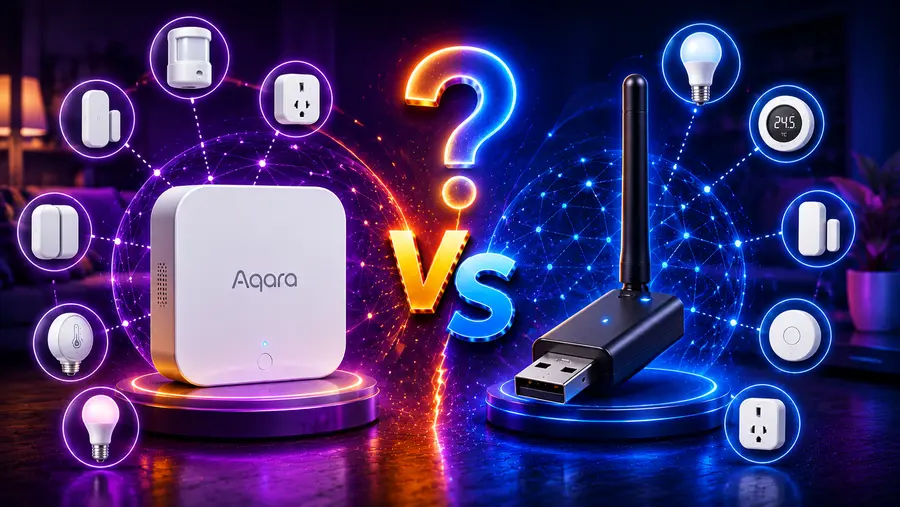
If you are leaning toward Aqara’s fantastic ecosystem of affordable and reliable sensors, you will inevitably face a critical question: Do you still need an Aqara Hub if you already have a Zigbee dongle?
The short answer is: Technically no, but practically, it depends on what you want out of your smart home.
If you are running a custom smart home server like Home Assistant with a Zigbee USB dongle, you can absolutely pair most Aqara devices directly to it without ever touching a proprietary Aqara hub. However, ditching the official hub means you will miss out on firmware updates, native Apple HomeKit seamlessness, and certain proprietary features.
Let’s break down this complex topic into a comprehensive, easy-to-read guide so you can build the ultimate, future-proof smart home network.
Introduction: The Smart Home Dilemma – Aqara Hubs vs. Zigbee Dongles
Building a smart home is like assembling a digital orchestra. Your sensors, lights, and switches are the musicians, but they need a conductor to keep them in sync. For years, the standard approach was to buy a brand’s specific “conductor”—their proprietary hub. If you bought Philips Hue bulbs, you bought the Hue Bridge. If you bought Aqara sensors, you bought the Aqara Hub.
But as smart homes evolved, enthusiasts grew tired of having five different hubs plugged into their routers, all speaking different languages. Enter the universal Zigbee dongle.
A Zigbee dongle is a generic antenna (usually resembling a USB thumb drive) that plugs into a computer or a Raspberry Pi running smart home software like Home Assistant. It acts as a universal translator, allowing you to bypass proprietary hubs and connect devices from dozens of different brands into one unified network.
So, if a $30 Zigbee dongle can talk to Aqara devices, why does Aqara still sell their hubs? And more importantly, why do some advanced users still choose to keep them around? The answer lies in the nuances of network architecture, device management, and the emerging standard known as Matter.
Understanding the Basics: What Are Aqara Hubs and Zigbee Dongles?
To make an informed decision, you first need to understand the hardware at play. Both devices serve the same fundamental purpose—translating Zigbee radio signals into IP (Internet Protocol) data your home network can understand—but they go about it in very different ways.
The Zigbee Protocol
Zigbee is a wireless mesh network standard specifically designed for low-power devices. Unlike Wi-Fi, which drains batteries rapidly, Zigbee allows tiny devices like door sensors and temperature monitors to run for years on a single coin-cell battery. Because your smartphone and standard Wi-Fi router do not have Zigbee antennas built-in, you need a “bridge” to translate Zigbee signals into Wi-Fi or Ethernet data.
The Universal Zigbee Dongle
A Zigbee dongle, such as the popular Sonoff Zigbee 3.0 USB Dongle Plus or the ConBee II, is essentially a raw radio antenna. It doesn’t have a built-in app, it doesn’t connect to the cloud, and it doesn’t have a user interface.
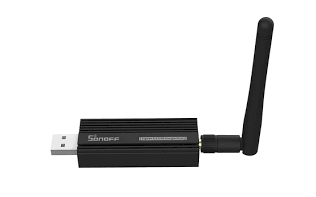
It is designed to be plugged into a host machine (like a Raspberry Pi, Mini PC, or NAS) running a robust smart home operating system like Home Assistant (Majib et al., 2023). The software acts as the “brain,” while the dongle acts as the “ears and mouth.”
Through software integrations like Zigbee2MQTT (Z2M) or Zigbee Home Automation (ZHA), this single dongle can pair with thousands of different Zigbee devices across hundreds of brands, creating one massive, unified mesh network.
The Proprietary Aqara Hub
An Aqara Hub (like the M2, M1S, or Camera Hub G3) is an all-in-one appliance. It contains the Zigbee antenna, the “brain” (processor), and the software required to manage the devices.
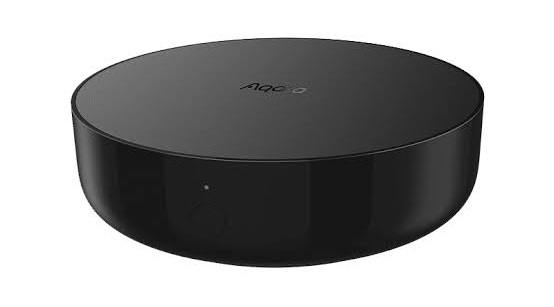
When you buy an Aqara hub, you are buying into the Aqara ecosystem. You use the Aqara Home app to pair devices, set up automations, and connect to cloud services like Amazon Alexa or Google Assistant. The hub does all the heavy lifting out of the box. It requires zero coding, no flashing of software, and no external servers. You plug it into the wall, connect it to your Wi-Fi, and it simply works.
The Argument for the Zigbee Dongle: Why Go Hub-Free?
For the tech-savvy user, the universal Zigbee dongle paired with Home Assistant is the holy grail of smart home automation. Removing the proprietary Aqara hub from your setup offers several massive advantages.
100% Local Control and Privacy
When you use a proprietary hub, your data often travels through the manufacturer’s cloud servers. When a sensor triggers, that signal might go from the sensor, to the hub, to the internet, to a cloud server, back to your hub, and finally to your smartphone.
With a Zigbee dongle and Home Assistant, everything stays strictly within the four walls of your house. If your internet goes down, your smart home still works perfectly. Your data is not being farmed or analyzed by third-party servers, ensuring maximum privacy.
A Single, Unified Mesh Network
Zigbee relies on a “mesh” topology. This means that wall-powered devices (like smart plugs or lightbulbs) act as “routers,” repeating the signal to extend the range of the network.
If you use an Aqara hub for your Aqara sensors, and a Philips Hue bridge for your lights, you are creating two completely separate, weak Zigbee networks that compete for the same radio frequencies. By ditching the hubs and using a single Zigbee dongle, all of your wall-powered devices from any brand will work together to create one giant, robust, and highly resilient mesh network.
Ultimate Automation Power
The Aqara Home app is great for simple rules (“If the door opens, turn on the light”). But what if you want complex logic? What if you want the light to turn on only if the door opens, and it’s after sunset, and nobody is currently watching a movie on the Apple TV, and the outdoor temperature is below 60 degrees?
By connecting your Aqara sensors directly to a Zigbee dongle via Zigbee2MQTT, you can feed their data directly into Home Assistant. This unlocks limitless automation potential, integrating MQTT and Zigbee protocols to enable complex, context-aware decision-making routines that proprietary hubs simply cannot handle (Khomenko, n.d.).
Avoiding “Hub Clutter”
Nobody wants five different white plastic pucks taking up all the Ethernet ports on their router. Consolidating everything into a single USB dongle significantly reduces physical clutter, saves energy, and simplifies your IT infrastructure.
The Case for the Aqara Hub: When a Dongle Isn’t Enough
If the Zigbee dongle is so powerful, why do many hardcore smart home enthusiasts still recommend buying an Aqara Hub? Because while universal dongles offer freedom, proprietary hubs offer polish, maintenance, and specific integrations that third-party software struggles to replicate.
Firmware Updates (OTA)
This is the single biggest reason to own an Aqara hub. Smart home devices are essentially tiny computers, and like all computers, they occasionally have bugs. Manufacturers release Over-The-Air (OTA) firmware updates to fix battery drain issues, improve connection stability, or add new features.
While open-source platforms like Zigbee2MQTT can perform some OTA updates, it is highly dependent on whether the community has been able to extract the firmware files. Aqara does not readily share their proprietary firmware with third-party developers. Therefore, the only guaranteed way to update the firmware on an Aqara motion sensor, door contact, or smart lock is by pairing it directly to an official Aqara hub.
Many advanced users keep a “maintenance hub” hidden in a closet. They run their house on a Zigbee dongle, but if an Aqara sensor starts misbehaving, they temporarily pair it to the Aqara hub, pull down the latest firmware, and then move it back to the dongle.
Native Apple HomeKit Support
Aqara is famous in the smart home community for offering some of the most affordable and reliable Apple HomeKit-certified accessories on the market. If you pair an Aqara sensor to an Aqara hub, it is instantly and natively exposed to Apple HomeKit.
While you can technically bridge devices from Home Assistant into HomeKit using a Zigbee dongle, it is a workaround. If you are a dedicated Apple user who wants the rock-solid stability of native HomeKit architecture without tinkering with software bridges, the Aqara Hub is the way to go.
Proprietary Features and “Quirks”
Aqara devices are notorious for slightly deviating from the standard Zigbee 3.0 protocol. This is known in the community as “Zigbee quirks.” While standard sensors usually pair fine with a dongle, specialized devices often lose functionality without the official hub.
For example, the Aqara FP2 Presence Sensor (a highly advanced millimeter-wave radar sensor) requires the Aqara app to map out the zones in your room.
Similarly, the Aqara U100 Smart Lock relies heavily on the Aqara hub for managing user pin codes, Apple HomeKey integration, and advanced security logs. If you pair these complex devices directly to a generic dongle, you will likely lose access to their best features.
Hub-Based Alarms and IR Blasters
Many Aqara hubs serve dual purposes. The Aqara M2 Hub has a built-in Infrared (IR) blaster, allowing you to control older “dumb” devices like TVs and air conditioners.
The M1S hub features a built-in speaker and an LED ring light, acting as an active security siren or a nightlight. If you bypass the hub and just use a dongle, you lose access to this extra hardware.
The Matter Protocol Factor: Changing the Smart Home Landscape
You cannot discuss the future of smart home hubs without mentioning Matter.
Matter is the new, open-source interoperability standard developed by a consortium of tech giants, including Apple, Google, Amazon, and Samsung. Its goal is simple: to make sure any smart home device can talk to any other device, regardless of the brand, locally and securely.
Matter operates over Wi-Fi and Thread (a new mesh networking standard) and relies on IPv6 for network-layer communication (Schlett et al., 2026).
How Matter Impacts the Aqara Hub
Aqara has been highly proactive in embracing the Matter standard. Through a recent software update, Aqara hubs (like the M2) have been upgraded to act as Matter Bridges.
This is a game-changer for the “Hub vs. Dongle” debate. Previously, if you used an Aqara hub, your devices were trapped in the Aqara ecosystem (or HomeKit). Now, the Aqara hub can take all the Zigbee sensors connected to it and translate them into the universal Matter language.
This means you can plug in an Aqara Hub, pair all your sensors to it (gaining the benefits of official firmware updates and proprietary features), and then use Matter to expose those sensors locally to Home Assistant, Google Home, or Amazon Alexa. You get the best of both worlds: the stability and maintenance of the proprietary hub, combined with the local, cross-platform freedom of a universal system.
Thread and the Future of Zigbee
While Zigbee is not dead, the industry is slowly moving toward Thread. Thread is essentially the evolution of Zigbee—it is a low-power mesh network, but unlike Zigbee, it is IP-based, meaning devices can communicate directly with the internet without needing a dedicated protocol translator.
Aqara is beginning to release Thread-based sensors (like the Aqara Door and Window Sensor P2). These Thread devices do not require a Zigbee dongle or a traditional Zigbee Aqara Hub. Instead, they require a “Thread Border Router,” which could be an Apple TV 4K, a Google Nest Hub, or a newer Aqara Hub like the M3.
As you future-proof your home, your reliance on both Zigbee dongles and legacy hubs will decrease in favor of Thread Border Routers.
Detailed Comparison: Performance, Security and Ease of Use
To help you decide which route to take, let’s look at a direct, side-by-side comparison of running an Aqara Hub versus running a universal Zigbee Dongle (with Home Assistant).
| Feature | Universal Zigbee Dongle (e.g., Z2M/ZHA) | Proprietary Aqara Hub |
| Ease of Setup | High learning curve. Requires dedicated hardware (Pi/PC) and software configuration. | Plug and play. Setup takes under 5 minutes via a mobile app. |
| Device Compatibility | Exceptional. Supports thousands of devices from hundreds of brands. | Limited. Primarily supports only Aqara and Xiaomi ecosystem devices. |
| Mesh Network Health | Excellent. Combines all brands into one strong mesh network. | Fragmented. Creates a separate mesh network just for Aqara devices. |
| Firmware Updates | Hit or miss. Community-driven OTA updates can be unreliable or delayed. | Guaranteed. Official, one-click OTA updates directly from the manufacturer. |
| Local Control | 100% Local. No cloud dependence; works perfectly offline. | Mostly local via HomeKit or Matter, but app relies on cloud connections. |
| Advanced Device Features | Basic features work, but advanced configurations (like radar mapping) may be lost. | 100% feature retention. Full access to device-specific settings and UI. |
Network Stability and “The Xiaomi Drop”
It is worth noting a historical technical quirk. Older Aqara and Xiaomi sensors were notorious for dropping off third-party Zigbee networks. If you had a Zigbee dongle, and your mesh network relied on smart plugs from brands like Centralite or Osram to route signals, Aqara sensors would frequently disconnect. They were stubbornly designed to only route through specific hubs.
If you are using a modern Zigbee 3.0 dongle (like those featuring the Texas Instruments CC2652 chip) and modern Aqara Zigbee 3.0 sensors (like the T1 line), this issue is largely resolved. However, if you are buying cheap, older Aqara sensors off AliExpress, you may experience random disconnects unless you use the official Aqara hub.
Final Verdict: How to Choose the Right Setup for Your Home
So, do you still need an Aqara Hub if you have a Zigbee dongle?
Scenario A: You are a tinkerer who loves Home Assistant.
If you enjoy managing your own servers, value absolute privacy, and want to mix and match sensors from Philips, IKEA, Sonoff, and Aqara into one massive, impenetrable mesh network, you do not need the Aqara Hub. The Sonoff Zigbee 3.0 dongle paired with Zigbee2MQTT will be your best friend. Just accept that you might miss out on occasional firmware updates.
Scenario B: You want a system that “Just Works.”
If the idea of flashing firmware onto a USB stick or reading error logs gives you a headache, stick with the Aqara Hub. It is incredibly reliable, updates your devices seamlessly, and pushes everything beautifully into Apple HomeKit or Google Home.
Scenario C: The Hybrid Approach (The Expert Recommendation).
For the true smart home aficionado, the answer is both.
Run your home’s core logic on Home Assistant with a Zigbee dongle. Buy an Aqara hub (like the affordable E1 USB hub) and keep it in a drawer. Once a year, plug it in, pair your sensors to it to download the latest firmware patches, and then migrate them back to your dongle.
Alternatively, use the Aqara Hub purely as a Matter Bridge, retaining the official app’s polish while feeding the local data straight into your custom server.
Ultimately, both paths lead to a highly capable smart home. Your choice depends entirely on your tolerance for troubleshooting and your desire for cross-brand integration.
Conclusion
Navigating the transition from proprietary ecosystems to universal, open-source smart home management can be intimidating.
While a universal Zigbee USB dongle empowers you to bypass manufacturer restrictions, build a stronger, brand-agnostic mesh network, and process all your data locally through platforms like Home Assistant, it isn’t a flawless replacement for official hardware.
Proprietary Aqara hubs still hold significant value. They provide critical firmware updates, ensure complex devices like millimeter-wave sensors retain their advanced functionality, and offer plug-and-play simplicity for ecosystems like Apple HomeKit.
Furthermore, with Aqara’s adoption of the Matter standard, their hubs now offer bridge capabilities that merge official stability with open-source flexibility.
For the average user, the Aqara hub remains the safest bet. But for the dedicated enthusiast, a Zigbee dongle is the key to total home automation freedom—provided you are willing to keep a spare hub around for occasional maintenance.
References
Khomenko, Y. (n.d.). Modular IoT Architecture for Monitoring and Control of Office Environments Based on Home Assistant. MDPI. https://www.mdpi.com/2624-831X/6/4/69
Majib, Y., Alosaimi, M., Asaturyan, A., & Perera, C. (2023). Dataset for cyber–physical anomaly detection in smart homes. Frontiers in the Internet of Things, 2. https://doi.org/10.3389/friot.2023.1275080
Schlett, K. A., Genge, B., Padurean, I., & Sciancalepore, S. (2026). Identifying Interactions and IoT Device Types in Encrypted Matter Traffic. arXiv. https://arxiv.org/pdf/2602.01932
Read Here: Home Assistant Green vs Raspberry Pi 5: The Best Hub for Local Automation