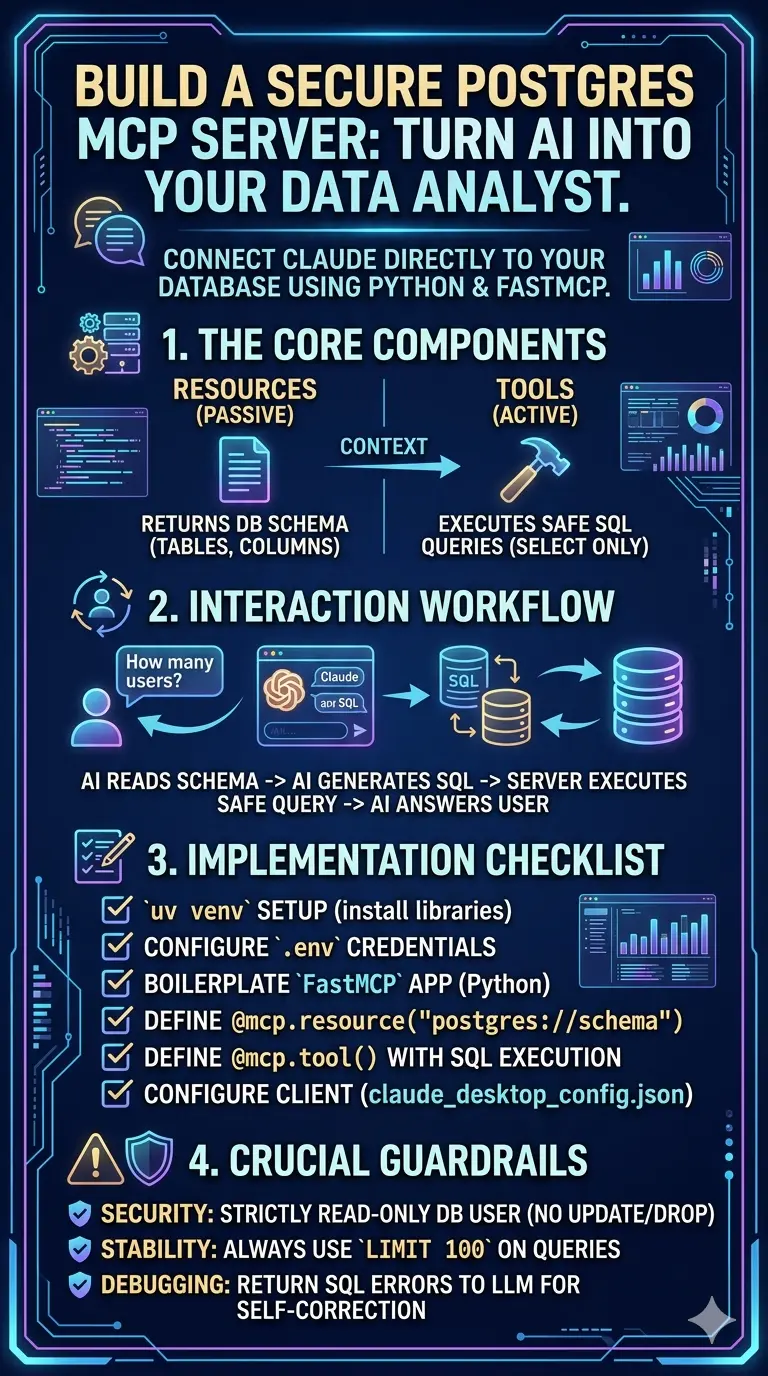
Want your AI to chat directly with your PostgreSQL database without security nightmares? Building a Model Context Protocol (MCP) server is the answer! Think of it as a secure translator. Using Python and FastMCP, simply create a read-only database user. Then, use the @mcp.resource decorator to expose your schema, and @mcp.tool to let the AI safely execute SELECT queries. Finally, register the script in your Claude Desktop config. Boom—your AI is now a brilliant, autonomous data analyst!
Learn how to build a Model Context Protocol (MCP) server for PostgreSQL using Python and FastMCP. Securely connect your LLM to execute read-only SQL queries. Turn your AI into an autonomous data analyst.

How to Build a Model Context Protocol (MCP) Server for PostgreSQL (Using Python & FastMCP)
To build an MCP server for PostgreSQL, initialize a Python environment using uv and install mcp[cli] and psycopg2. Use the FastMCP high-level API to define Resources (to passively provide the LLM with your database schema) and Tools (to execute active, read-only SQL queries). Finally, register the Python script in your Claude Desktop claude_desktop_config.json file to establish a secure local stdio connection.
The Paradigm Shift: Why MCP and PostgreSQL?
In the early days of generative AI, connecting a Large Language Model (LLM) to a business database was a messy, fragile process. Developers had to build custom middleware, write complex Retrieval-Augmented Generation (RAG) pipelines, and constantly update API glue code every time the database schema changed.
The Model Context Protocol (MCP) fundamentally changes this.
Created by Anthropic and adopted as an open standard, MCP is to AI models what the USB-C port is to hardware. It provides a universal, standardized way for AI agents to plug into external data sources. When you build an MCP server for PostgreSQL, you are creating a universal translator. You are teaching the AI exactly how to read your tables, understand your relationships, and pull data on demand—without exposing your raw database to the public internet.
Why FastMCP?
You can build an MCP server using the low-level SDK, but in 2026, the industry standard for Python developers is FastMCP. Inspired by FastAPI, FastMCP abstracts away the complex underlying JSON-RPC protocol. It allows you to expose database functions to an LLM using simple @mcp.resource and @mcp.tool decorators. It automatically handles type hinting, JSON schema generation, and asynchronous communication.
Architectural Blueprint: Resources vs. Tools
Before writing a single line of code, you must understand how an AI model interacts with your data. MCP categorizes interactions into three primary primitives: Resources, Prompts, and Tools. For a PostgreSQL database, we only need to focus on two.
| MCP Primitive | How the AI Uses It | Database Use Case |
| Resources | Passive reading. The AI reads this data to gain context before acting. | Providing the Database Schema (table names, column types, foreign keys). |
| Tools | Active execution. The AI asks the server to perform an action and return the result. | Executing a SELECT Query to fetch specific rows of business data. |
The Workflow:
- The user asks Claude: “How many new users signed up in London last week?”
- Claude reads the Resource (the schema) and discovers a users table with signup_date and city columns.
- Claude calls the Tool (the query executor) and passes the generated SQL string: SELECT count(*) FROM users WHERE city = ‘London’…
- The MCP server executes the SQL, formats the result, and returns it to Claude.
- Claude presents a natural language answer to the user.
Preparation and Security Guardrails
The most critical aspect of connecting an LLM to a SQL database is security. If an AI generates an UPDATE or DROP TABLE command, your server must never execute it.
Creating a Read-Only Database User
Do not use your main database administrator account. Create a dedicated read-only role in PostgreSQL specifically for the MCP server.
SQL
-- Run this in your PostgreSQL console
CREATE ROLE mcp_ai_user WITH LOGIN PASSWORD 'your_secure_password';
GRANT CONNECT ON DATABASE your_database TO mcp_ai_user;
GRANT USAGE ON SCHEMA public TO mcp_ai_user;
GRANT SELECT ON ALL TABLES IN SCHEMA public TO mcp_ai_user;
ALTER DEFAULT PRIVILEGES IN SCHEMA public GRANT SELECT ON TABLES TO mcp_ai_user;
This guarantees that even if a “prompt injection” attack tricks the AI into writing malicious SQL, the database engine will reject the transaction.
The Complete Developer’s Guide to PostgreSQL MCP Implementation
Follow this sequence to build, code, and deploy your FastMCP Postgres server. We will use uv, the extremely fast Python package manager that has become the standard in modern Python development.
1.Initialize the Environment:
Use ‘uv’ for dependency management.
Open your terminal and create a new project directory. Initialize a virtual environment and install the necessary libraries. mcp[cli] provides the FastMCP framework, psycopg2-binary connects to Postgres, and python-dotenv handles our credentials securely.
Bash
mkdir mcp-postgres-server
cd mcp-postgres-server
uv venv
source .venv/bin/activate
uv pip install "mcp[cli]" psycopg2-binary python-dotenv
2.Configure Environment Variables:
Never hardcode database credentials. Create a .env file in the root of your project directory. The FastMCP server will read these variables when it boots up.
env
DB_HOST=localhost
DB_PORT=5432
DB_NAME=your_database
DB_USER=mcp_ai_user
DB_PASSWORD=your_secure_password
3.Write the Boilerplate Server Code:
Setup FastMCP and psycopg2.
Create a file named server.py. We will initialize the FastMCP object and create a helper function to establish a connection to the PostgreSQL database.
Python
import os
import psycopg2
from psycopg2.extras import RealDictCursor
from dotenv import load_dotenv
from mcp.server.fastmcp import FastMCP

# Load environment variables
load_dotenv()

# Initialize the MCP server
mcp = FastMCP("PostgreSQL Data Explorer")

def get_db_connection():
    """Creates and returns a connection to the PostgreSQL database."""
    return psycopg2.connect(
        host=os.getenv("DB_HOST"),
        port=os.getenv("DB_PORT"),
        dbname=os.getenv("DB_NAME"),
        user=os.getenv("DB_USER"),
        password=os.getenv("DB_PASSWORD")
    )
4.Define the Schema Resource:
Teach the LLM about your database.
The AI needs to know what tables exist. We use the @mcp.resource decorator to expose the schema. The URI postgres://schema is an arbitrary string that the AI will use to request this specific document.
Python
@mcp.resource("postgres://schema")
def get_database_schema() -> str:
    """Returns the full database schema so the AI knows what tables and columns exist."""
    query = """
        SELECT table_name, column_name, data_type
        FROM information_schema.columns
        WHERE table_schema = 'public'
        ORDER BY table_name;
    """
    try:
        with get_db_connection() as conn:
            with conn.cursor(cursor_factory=RealDictCursor) as cur:
                cur.execute(query)
                rows = cur.fetchall()

                # Format the output for the AI to easily read
                schema_text = "Database Schema:\n"
                current_table = ""
                for row in rows:
                    if row['table_name'] != current_table:
                        current_table = row['table_name']
                        schema_text += f"\nTable: {current_table}\n"
                    schema_text += f" - {row['column_name']} ({row['data_type']})\n"

                return schema_text
    except Exception as e:
        return f"Error retrieving schema: {str(e)}"
5.Define the Query Execution Tool:
Give the LLM read capabilities.
Now we give the AI a tool to actually run queries. Notice the detailed docstring — FastMCP automatically passes this docstring to the AI. The AI uses these instructions to understand the tool’s purpose and limitations.
Python
@mcp.tool()
def execute_read_query(sql_query: str) -> str:
    """
    Execute a SELECT query against the PostgreSQL database.
    ONLY SELECT queries are allowed. Do not attempt to use INSERT, UPDATE, or DELETE.
    Always limit your results to a maximum of 100 rows to prevent overwhelming the context window.
    """
    # Secondary security guardrail (String validation)
    if not sql_query.strip().upper().startswith("SELECT"):
        return "Error: Only SELECT queries are permitted."

    try:
        with get_db_connection() as conn:
            with conn.cursor(cursor_factory=RealDictCursor) as cur:
                # Execute the query provided by the LLM
                cur.execute(sql_query)
                rows = cur.fetchall()

                if not rows:
                    return "Query executed successfully, but returned no results."

                # Format as a string so the LLM can read it
                return str(rows)
    except Exception as e:
        # Return the SQL error to the LLM so it can self-correct and try again
        return f"PostgreSQL Error: {str(e)}"
6.Run the Server:
Initialize the stdio loop.
Finally, at the bottom of server.py, add the execution block. FastMCP defaults to standard input/output (stdio) communication, which is the most secure way for a local desktop app to talk to a local script.
Python
if __name__ == "__main__":
    # Start the MCP server using standard input/output
    mcp.run()
Connecting the Client (Claude Desktop)
Your server code is complete, but it is currently sitting dormant. You need an MCP Client to interact with it. The most common client for local development is the Claude Desktop Application.
To connect them, you must edit the Claude Desktop configuration file. This file tells Claude where your Python script is and how to launch it.
Locate your configuration file:
- macOS: ~/Library/Application Support/Claude/claude_desktop_config.json
- Windows: %APPDATA%\Claude\claude_desktop_config.json
Open the file in a text editor and add your server. You must provide the absolute path to the uv executable, and the absolute path to your server.py file.
JSON
{
  "mcpServers": {
    "local-postgres": {
      "command": "/Users/yourname/.cargo/bin/uv",
      "args": [
        "run",
        "--with",
        "mcp[cli]",
        "--with",
        "psycopg2-binary",
        "--with",
        "python-dotenv",
        "/absolute/path/to/your/mcp-postgres-server/server.py"
      ],
      "env": {
        "DB_HOST": "localhost",
        "DB_PORT": "5432",
        "DB_NAME": "your_database",
        "DB_USER": "mcp_ai_user",
        "DB_PASSWORD": "your_secure_password"
      }
    }
  }
}
The Environment Variable Injection: Notice that we define the env object directly in the JSON file. When Claude Desktop launches the MCP server, it creates a subprocess and injects these variables. This ensures the server always has the correct credentials, even if it ignores your local .env file.
Once you save this file, completely quit and restart the Claude Desktop application. You will see a small “plug” icon or “hammer” icon indicating that tools are available. You can now type: “Look at my local-postgres database and tell me what tables exist.”
Dealing with LLM Hallucinations and Context Limits
Connecting a database is easy; making the AI interact with it reliably is hard. Here are the advanced engineering concepts you must implement for a production-grade internal tool.
Self-Correcting Error Loops
One of the most powerful aspects of MCP is that the AI can learn from its mistakes in real-time. If the AI writes a query with a syntax error (e.g., querying a column that doesn’t exist), the PostgreSQL database throws an exception.
Because we structured our execute_read_query tool to return the error string (return f”PostgreSQL Error: {str(e)}”), the AI will read the error, realize its mistake, look back at the schema resource, rewrite the query, and run the tool again. This autonomous debugging happens in milliseconds, totally invisible to the end-user.
Context Window Protection
Databases hold millions of rows. If the AI queries SELECT * FROM users; on a massive table, the resulting data string will exceed the LLM’s context window. This causes the model to crash, hallucinate, or silently truncate data.
How to solve this:
- Hardcoded Limits: In your Python tool, append LIMIT 100 to the SQL query programmatically if the AI forgets to include it.
- Prompt Engineering in the Docstring: Tell the AI to use aggregations. In your tool’s docstring, add: “Do not fetch raw rows if asked for metrics. Write SQL to compute averages, sums, and counts on the database side, and only return the final aggregated numbers.”
Using System Prompts with FastMCP
FastMCP allows you to define “Prompts” as well. While Resources are data and Tools are actions, Prompts are reusable instructional templates. You can define a prompt that instructs the AI on the specific business logic of your company.
Python
@mcp.prompt()
def data_analyst_persona() -> str:
    return """
    You are a senior data analyst. When querying the PostgreSQL database,
    always factor in that the 'revenue' column is recorded in cents, not dollars.
    Always convert cents to dollars in your SQL queries by dividing by 100
    before presenting the data to the user.
    """
Troubleshooting & Diagnostics
If your MCP server isn’t working, the problem almost always lies in the stdio transport layer. Because standard input and output are being used to pass JSON-RPC messages between Claude and your script, you cannot use print() statements in your Python code for debugging. If you print a random string, it breaks the JSON protocol and the client disconnects.
Symptom: Claude Desktop shows the tool loading, but it hangs forever or instantly disconnects.
Cause: Your script threw an error on startup, or you left a print() statement in the code.
Solution: Use the Python logging module and write your logs to an external file.
Python
import logging

# Configure logging to write to a file, NOT to standard output
logging.basicConfig(
    filename='mcp_server.log',
    level=logging.INFO,
    format='%(asctime)s - %(levelname)s - %(message)s'
)

# Inside your tool:
logging.info(f"The LLM attempted to execute: {sql_query}")
Symptom: “Command not found: uv”
Cause: The Claude app does not inherit your terminal’s PATH variables.
Solution: Always use the absolute path to your Python interpreter or uv executable in the claude_desktop_config.json file. You can find the path by typing which uv (Mac/Linux) or where uv (Windows) in your terminal.
Building an MCP server bridges the gap between the reasoning engine of an LLM and the hard, factual data of your business. By providing a strict schema resource and a read-only query tool, you give the AI the exact boundaries it needs to act as an autonomous, highly accurate data analyst.
10 Key FAQs: Building an MCP Server for PostgreSQL
1. What is an MCP server for PostgreSQL?
An MCP server acts as a secure, universal bridge between Large Language Models and your PostgreSQL database. It translates natural language prompts into SQL queries, executes them safely, and returns the structured data directly to the AI interface.
2. Why use FastMCP instead of the standard MCP SDK?
FastMCP, inspired by FastAPI, significantly simplifies development in 2026. It abstracts away complex JSON-RPC protocols, automatically generating schemas and type hints. You only need simple Python decorators to expose your database functions to the LLM.
3. How does the AI know what tables exist in my database?
You expose your database schema using an @mcp.resource decorator. The AI passively reads this resource document first to understand table names, columns, and data types before attempting to generate and execute any specific SQL queries.
4. Can the AI accidentally delete or alter my database?
No, if configured correctly. You must create a strict read-only PostgreSQL user for the server. Additionally, implement regex validation inside your Python tool to immediately reject any INSERT, UPDATE, DELETE, or DROP commands the AI generates.
5. How do I prevent the LLM from crashing due to too much data?
Enforce hard limits in your Python execution code. Append LIMIT 100 to all incoming SQL queries automatically. Also, use the tool’s docstring to instruct the AI to perform mathematical aggregations server-side instead of returning raw rows.
6. Why is my MCP server failing to connect in Claude Desktop?
Connection failures usually stem from incorrect file paths. Ensure your claude_desktop_config.json uses the absolute path to both the uv executable and your Python script. The desktop client does not inherit your local terminal environment variables.
7. Can I use print() statements to debug my FastMCP server?
No. Local MCP servers communicate with the client using standard input and output (stdio). Using print() injects random text into the JSON-RPC protocol, breaking the connection. Instead, use Python’s logging module to write debug data to external files.
8. What is the difference between an MCP Tool and a Resource?
Resources provide passive, read-only data for context, like your database schema. Tools are active executable functions. The AI calls a Tool, like executing a generated SELECT query, and waits for your Python server to return the results.
9. How do I handle database credentials securely in MCP?
Never hardcode passwords in your Python script. Use a .env file for local testing, and inject environment variables directly into the env object within your claude_desktop_config.json file. The host application will securely pass them to your server.
10. Do I need to write SQL queries for the AI?
No. You only provide the schema and a tool to execute SQL. The LLM acts as the autonomous data analyst, writing the specific SQL queries dynamically based on the user’s natural language questions and the provided database context.
Read Here: The Role of Agentic AI in Business Process Automation