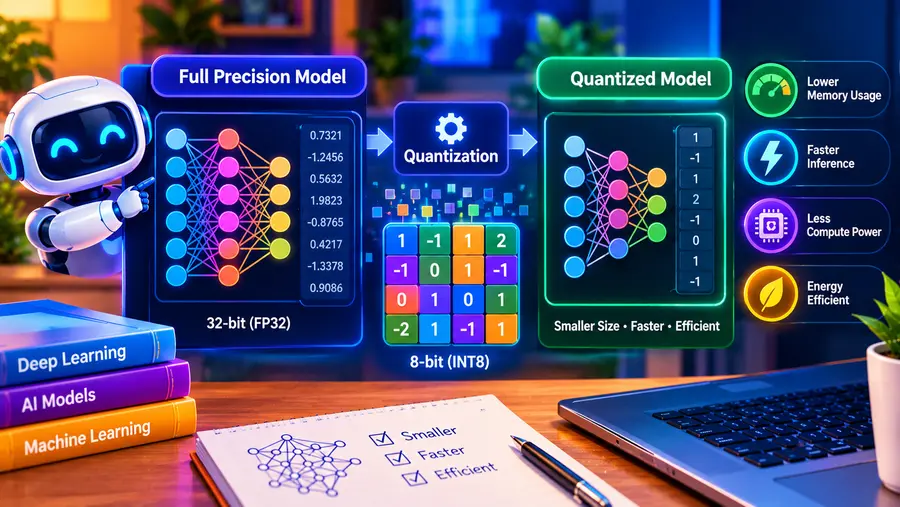
AI model quantization is a technique that reduces the numerical precision used to store and process an AI model’s parameters. The main goal is to make models smaller and less demanding in terms of memory and computation while preserving as much of their original quality as practical.
For example, a model that normally uses 16-bit or 32-bit values can be converted to a lower-precision format such as 8-bit or 4-bit quantization.
Lower-precision versions can require substantially less memory and may make it easier to run large language models (LLMs) on consumer hardware.
Google describes quantization as a way to use lower-precision data so models consume less compute and memory while potentially retaining useful performance.
This is especially important for local AI. Quantized models can allow users to run models on laptops, desktops and consumer GPUs that would otherwise require much more memory.
In this guide, you’ll learn what AI model quantization is, how it works, what Q4, Q5, Q8 and 16-bit mean, how quantization affects model quality and speed, and which quantization level makes sense for local AI.
Quick Answer: What Is AI Model Quantization?
AI model quantization is the process of representing a model’s weights and sometimes other numerical values with fewer bits than the original model uses.
For example:
- FP32 = 32-bit floating-point representation
- FP16 = 16-bit floating-point representation
- INT8 / 8-bit = lower-precision representation
- 4-bit quantization = approximately four bits per weight, depending on the specific quantization scheme
The benefit is straightforward:
Fewer bits generally mean a smaller model and lower memory requirements, although quality and performance can change depending on the quantization method.
Google’s Gemma documentation explains that models can be modified from higher precision to 16-, 8-, or 4-bit representations, reducing compute and memory requirements.
Why Is Quantization Important for AI?
Modern AI models can contain billions of parameters.
A large model can require enormous amounts of memory when stored and loaded at high precision.
For example, llama.cpp’s current documentation provides an illustrative comparison for Llama 3.1:
| Model | Original size | Q4_K_M size |
| 8B | 32.1 GB | 4.9 GB |
| 70B | 280.9 GB | 43.1 GB |
| 405B | 1,625.1 GB | 249.1 GB |
These figures show why quantization is so important for local AI. The exact memory requirement during inference is not simply the file size, because runtime, context and other overhead also matter.
Without quantization, many models would be difficult to run on ordinary consumer hardware.
With quantization, the same model family can become much more practical for:
- laptops
- desktop PCs
- consumer GPUs
- edge devices
- smartphones
- local AI servers
Google’s recent Gemma 4 QAT work also specifically focuses on reducing memory requirements and improving on-device efficiency.
How Does AI Quantization Work?
At a basic level, quantization replaces higher-precision numerical representations with lower-precision ones.
Imagine that a model’s weights are originally stored using a high-precision format.
Instead of representing each value with a large number of bits, quantization maps those values into a smaller numerical range.
A simplified example:
Original
32-bit values
↓
More precision
↓
More memory
Quantized
8-bit or 4-bit values
↓
Less precision
↓
Less memory
The conversion is not simply “delete half the bits.”
Quantization algorithms use techniques such as scaling and grouping to represent ranges of values efficiently.
The exact mathematics varies between quantization methods.
What Does “Bits” Mean in AI Models?
When you see terms such as:
FP32, FP16, INT8, Q8, Q5 or Q4
they describe the numerical precision or quantization scheme used for model data.
Generally:
More bits → more numerical precision → larger memory requirement
and:
Fewer bits → less numerical precision → smaller memory requirement
But don’t assume that every 4-bit model behaves identically.
Different quantization formats use different methods and can have different effects on model quality and inference performance.
What Is FP32?
FP32 means 32-bit floating-point representation.
It is a high-precision format commonly used in machine learning.
A simplified way to think about it is:
Each numerical value gets 32 bits of representation.
This provides substantial numerical precision but also requires more memory.
For local LLM inference, storing every model weight at FP32 can be extremely expensive in terms of memory.
What Is FP16?
FP16 uses 16-bit floating-point values.
It requires roughly half the storage of FP32 for the same number of values.
FP16 is widely used for neural-network inference and training because it can reduce memory requirements while retaining substantial numerical precision.
Google’s Gemma documentation recommends 16-bit precision for many standard use cases and describes lower-bit quantization as an option when memory and compute efficiency are important.
What Is 8-Bit Quantization?
8-bit quantization represents model values using a lower-precision 8-bit representation.
Compared with 16-bit storage, this can significantly reduce model memory requirements.
8-bit quantization is often considered a compromise between:
- memory savings
- computational efficiency
- model quality
The exact behavior depends on the model and quantization technique.
What Is 4-Bit Quantization?
4-bit quantization represents model weights using approximately four bits per weight, depending on the specific method.
This can dramatically reduce model size compared with 16-bit representations.
That’s why 4-bit models are particularly popular for local LLM inference.
For example, llama.cpp documents Q4_K_M as a common 4-bit quantization option and shows substantial reductions in model size compared with higher-precision versions.
However:
4-bit does not automatically mean “best.”
A lower-bit model may introduce more quality loss depending on the model, data distribution and quantization method.
What Do Q4, Q5, Q6 and Q8 Mean?
You’ll often encounter names such as:
- Q4
- Q5
- Q6
- Q8
- Q4_K_M
- Q5_K_M
These refer to specific quantization schemes.
For example, Hugging Face’s current GGUF documentation lists quantization types including:
- Q2_K
- Q3_K
- Q4_K
- Q5_K
- Q6_K
- Q8_K
The naming reflects different bit-widths and quantization strategies.
As a broad rule:
| Format | General idea |
| Q2 | Very aggressive compression |
| Q3 | Aggressive compression |
| Q4 | Strong compression, popular for local AI |
| Q5 | Middle ground |
| Q6 | Higher precision |
| Q8 | Relatively high precision |
These labels should be treated as general guidance, not as a universal quality ranking.
What Is Q4_K_M?
Q4_K_M is a specific quantization format used in the GGUF/llama.cpp ecosystem.
The “Q4” indicates a 4-bit quantization family, while the rest of the name identifies details of the quantization scheme.
llama.cpp currently provides Q4_K_M as an example quantization target and supports several other quantization methods.
For local AI users, Q4_K_M has become a common option because it can offer a useful balance between:
- model size
- memory usage
- inference performance
- output quality
But the best choice depends on the model and workload.
Why Do Quantized Models Use Less RAM?
Imagine a simplified model with:
1 billion weights
If each weight takes 16 bits:
1 billion × 16 bits
That’s a large amount of memory.
If the same weights can be represented using approximately 4 bits:
1 billion × 4 bits
The storage requirement can be much smaller.
That’s why quantization can dramatically reduce the memory footprint of large models.
In practice, the exact size is larger than this simple calculation because models contain metadata, scaling information and other components.
Does Quantization Reduce AI Model Quality?
It can.
This is the most important trade-off to understand.
Quantization removes some numerical precision.
That means the quantized model is not mathematically identical to the original higher-precision model.
The effect can be:
- negligible for some tasks
- noticeable for some tasks
- significant for aggressive quantization or sensitive workloads
llama.cpp explicitly notes that quantization can introduce some accuracy loss and discusses measuring this using metrics such as perplexity and KL divergence.
Therefore:
Quantization is a trade-off between efficiency and fidelity.
Does 4-Bit Quantization Make an AI Model Worse?
Not necessarily.
A well-designed 4-bit quantized model can still perform very well for many everyday tasks.
Modern quantization methods try to preserve the most important information while reducing memory usage.
The quality impact depends on:
- model architecture
- quantization method
- calibration data
- task
- context length
- model size
- implementation
Google’s quantization-aware training work is an example of a different approach: the model is trained while accounting for quantization effects so that quality can be better preserved when the model is later used in a lower-precision form.
What Is Quantization-Aware Training (QAT)?
Quantization-Aware Training, or QAT, is a training approach that simulates quantization effects during model training.
Instead of training a model entirely at full precision and quantizing it only afterward, QAT incorporates the expected effects of quantization into the training process.
The goal is to produce a model that maintains better quality after quantization.
Google describes its Gemma 4 QAT models as being designed to reduce quality loss while improving memory efficiency for local and edge deployment.
This is different from simply taking a finished model and converting it to a lower-precision format.
Post-Training Quantization vs Quantization-Aware Training
There are two major approaches.
Post-Training Quantization
A model is trained first and quantized afterward.
Train model
↓
Full-precision model
↓
Quantization
↓
Quantized model
This is convenient because you don’t have to retrain the model.
Quantization-Aware Training
Quantization effects are considered during training.
Training
↓
Simulated quantization
↓
Optimization
↓
Quantization-friendly model
This can help preserve model quality, although it requires a training process designed for the approach.
Does Quantization Make AI Models Faster?
It can, but not always.
Lower-precision models can reduce:
- memory bandwidth requirements
- model size
- memory usage
- computational workload
That can improve inference performance on compatible hardware.
However, actual speed depends on:
- CPU
- GPU
- VRAM
- memory bandwidth
- inference engine
- quantization format
- model architecture
- context size
llama.cpp notes that different quantization methods differ in model size and inference speed.
Therefore, don’t assume:
Q4 is always faster than Q8.
The result depends on the hardware and runtime.
Does Quantization Reduce VRAM Usage?
Yes, generally.
Because quantization reduces the amount of data required to represent model weights, a quantized model can require substantially less GPU memory.
For local AI, this is one of its biggest advantages.
For example, a model that doesn’t fit into a GPU’s VRAM at FP16 might fit partially or entirely after quantization.
That can make a significant difference for consumer GPUs.
However, context and runtime overhead still require additional memory.
Quantization and Local AI
Quantization is particularly important for running AI models on consumer PCs.
Suppose you have:
16GB system RAM
and a model that would require far more memory at high precision.
A quantized version may reduce the model’s footprint enough to make local inference practical.
This is why local AI tools and model repositories commonly provide multiple model variants with different quantization levels.
Hugging Face’s GGUF ecosystem, for example, provides multiple quantized variants that can be used with compatible inference engines such as llama.cpp.
Read Here: Local AI vs Cloud AI: What’s the Difference?
What Is GGUF?
GGUF is a model file format commonly used for local LLM inference.
It is designed to store tensors together with standardized metadata and is optimized for efficient loading and inference in compatible software.
Hugging Face describes GGUF as a binary format designed for efficient model loading and inference, and llama.cpp uses GGUF for its supported local model workflow.
You may therefore see files such as:
model-Q4_K_M.gguf
model-Q5_K_M.gguf
model-Q8_0.gguf
The filename gives you clues about both the file format and quantization.
Quantization vs Model Size
Quantization and parameter count are two different concepts.
For example:
8B model
describes the approximate number of parameters.
Q4
describes how those parameters are represented.
So you can have:
8B FP16
and:
8B Q4
They are still based on the same parameter count, but the numerical representation is different.
This distinction is extremely important when selecting local AI models.
Quantization vs Compression: Are They the Same?
Not exactly.
Compression is a broader concept.
It refers to techniques that reduce the storage or transmission size of data.
Quantization specifically reduces the precision used to represent numerical values.
Quantization can therefore be considered a form of model compression, but not all model compression techniques are quantization.
Other techniques include:
- pruning
- knowledge distillation
- low-rank methods
- weight sharing
Quantization vs Pruning
These techniques are different.
Quantization
Reduces the precision of existing values.
16-bit → 8-bit → 4-bit
Pruning
Removes some model weights or structures that are considered less important.
Original model
↓
Remove selected weights
↓
Smaller model
Both can reduce resource requirements, but they do it in different ways.
Quantization vs Knowledge Distillation
Knowledge distillation trains a smaller model to imitate a larger model.
For example:
Large teacher model
↓
Knowledge transfer
↓
Smaller student model
Quantization doesn’t necessarily reduce the parameter count.
Instead, it reduces the precision used to represent those parameters.
Which Quantization Level Should You Choose?
There is no single best quantization level for every model.
A useful starting framework is:
| Quantization | Typical trade-off |
| Q2–Q3 | Very small, but greater potential quality loss |
| Q4 | Strong memory savings with commonly useful quality |
| Q5 | More precision with somewhat higher memory use |
| Q6 | Higher fidelity with more memory |
| Q8 | Higher precision and larger memory footprint |
| FP16 | High precision, much larger memory requirement |
These descriptions are generalizations. Different quantization families can behave differently, and actual quality depends on the model and quantization implementation.
For many local AI users, Q4 or Q5 is a reasonable place to start when memory is limited, while higher-precision variants make more sense when you have sufficient hardware and want to minimize quantization effects.
Is Q4 Better Than Q8?
Not universally.
It depends on your priority.
Q4 may make more sense when:
- RAM is limited
- VRAM is limited
- you need a smaller download
- you want to run a larger model locally
Q8 may make more sense when:
- you have more memory
- quality preservation matters more
- the model already fits comfortably
- you want less aggressive quantization
So the better question is:
Which quantization provides the best balance for my hardware and workload?
How Quantization Helps an 8GB RAM PC
An 8GB computer has limited memory for local AI.
Quantized models can reduce the model’s memory requirements and make some smaller models feasible.
However, the operating system and applications still need memory.
So an 8GB computer should generally use smaller models and conservative context sizes.
This is why quantization is especially relevant for entry-level local AI.
How Quantization Helps a 16GB RAM PC
With 16GB RAM, quantization can make a broader range of local models practical.
For example, a model that is too large in FP16 may become manageable in a lower-bit format.
However, available RAM is less than the total installed RAM because the operating system and other applications consume memory.
Therefore:
16GB RAM ≠ 16GB available for the model.
How Quantization Helps a 32GB RAM PC
A 32GB system has significantly more room.
Quantization can allow you to:
- load larger models
- use longer contexts
- keep other applications open
- experiment with RAG
- run local coding assistants
- use larger model variants
Again, the GPU and VRAM may become the limiting factor rather than system RAM.
Read Here: How Much RAM Do You Need for Local AI?
How to Choose a Quantized Model
Before downloading a model, check these six things:
1. Parameter count
Example:
7B, 8B, 14B, 32B, 70B
2. Quantization level
Example:
Q4, Q5, Q6, Q8
3. Actual file size
Check the download size rather than assuming the size from the model’s parameter count.
4. Context length
A larger context window can increase memory requirements.
5. Your RAM and VRAM
Make sure you have enough memory for the model and other system overhead.
6. Software compatibility
Make sure your inference engine supports the model format.
For example, llama.cpp uses GGUF, and Hugging Face provides GGUF model repositories and quantization tools for compatible models.
Common AI Quantization Mistakes
Mistake 1: Assuming 4-bit means four times smaller
Not necessarily.
The actual model size depends on the quantization scheme and additional metadata.
Mistake 2: Assuming Q4 always has poor quality
Modern quantization techniques can preserve useful performance surprisingly well.
Quality loss depends on the model, method and task.
Mistake 3: Assuming Q8 is always better
Higher precision usually means greater numerical fidelity, but it also requires more memory.
If your GPU cannot fit the model efficiently, a lower quantization may provide a better practical experience.
Mistake 4: Looking only at parameter count
An 8B model can exist in multiple precisions and quantization formats.
Parameter count alone doesn’t tell you how much memory the model requires.
Mistake 5: Confusing file size with total RAM requirement
A model file can be smaller than the total memory needed while the model is actually running.
Context, runtime and system overhead matter.
Can Quantization Be Reversed?
Not perfectly.
Once a model has been quantized and precision information has been discarded, simply converting it back to FP16 or FP32 does not restore the original values.
You can create a higher-precision container from a quantized model, but it will not magically recover the information that was removed.
That’s why high-quality quantization should ideally be performed from the original higher-precision model.
llama.cpp specifically warns that repeatedly requantizing an already quantized model can cause substantially worse quality than quantizing from 16- or 32-bit weights.
Does Quantization Affect Accuracy?
Yes, potentially.
But “accuracy” isn’t always the best way to describe the effect on a generative language model.
Depending on the application, researchers may evaluate:
- perplexity
- KL divergence
- benchmark scores
- task-specific accuracy
- human preference
- instruction following
- coding performance
- reasoning performance
llama.cpp notes perplexity and KL divergence as ways to assess quantization impact.
Is Quantization Only Used for Language Models?
No.
Quantization is widely used across AI.
It can be applied to models for:
- computer vision
- speech recognition
- image generation
- recommendation systems
- robotics
- edge AI
- language models
- multimodal AI
The underlying idea remains similar: represent numerical values with less precision to reduce resource requirements.
Why Is Quantization Important for On-Device AI?
On-device AI has strict hardware constraints.
A smartphone, laptop or edge device usually has much less computing power and memory than a large data center.
Quantization can help reduce:
- memory usage
- storage requirements
- bandwidth requirements
- compute requirements
- power consumption
Google’s 2026 Gemma 4 QAT release specifically highlights quantization as part of making generative models more efficient on laptops, mobile devices and consumer GPUs.
A Simple Example
Suppose you have an AI model that would require roughly:
16GB at a particular higher-precision representation.
A quantized version might be significantly smaller.
That could change the hardware requirement from:
“This model won’t fit on my GPU.”
to:
“This model can now fit, or most of it can fit, on my hardware.”
That is the practical power of quantization.
Quantization and Local AI: The Big Picture
Think of a local AI system like this:
AI Model
↓
Choose precision
↓
FP16 / INT8 / Q8 / Q5 / Q4
↓
Smaller model
↓
Lower memory requirement
↓
Easier local deployment
Quantization is therefore one of the key technologies making local AI practical on consumer hardware.
Read Here: How to Run AI Models Locally on a PC
Frequently Asked Questions
What is AI model quantization in simple terms?
AI model quantization reduces the numerical precision used by a model so that it can use less memory and computing power.
What is 4-bit quantization?
4-bit quantization stores model values using a lower-precision representation that requires much less memory than 16-bit or 32-bit formats. The exact memory savings depend on the quantization scheme.
Is 4-bit quantization good?
4-bit quantization can provide a useful balance between model size and quality for many local AI workloads, but the actual result depends on the model and quantization method.
What is Q4_K_M?
Q4_K_M is a specific 4-bit quantization format commonly used with GGUF models and llama.cpp-compatible local inference.
What does Q8 mean?
Q8 generally refers to an 8-bit quantization format. It uses more memory than many 4-bit formats but generally preserves more numerical precision.
Does quantization reduce AI model quality?
It can. Lower precision introduces some loss of numerical information, although carefully designed quantization can preserve useful performance.
Does quantization make AI models faster?
It can, particularly when lower memory use reduces memory-bandwidth pressure or enables more efficient computation on supported hardware. Actual speed depends on the model, hardware and inference engine.
Does quantization reduce VRAM usage?
Yes. Quantized model weights generally require less memory, which can make larger models easier to fit on GPUs with limited VRAM.
What is the best quantization for local AI?
There is no universal best option. Q4 and Q5 are often useful starting points when memory is limited, while Q6, Q8 or FP16 may be preferable when you have enough memory and want to minimize quantization effects.
Can I run a 70B model with 4-bit quantization?
Potentially, yes, depending on the exact model, quantization format, RAM, VRAM, context size and inference software. A 4-bit file can be dramatically smaller than its high-precision counterpart, but “fits in memory” does not necessarily mean “runs quickly.” llama.cpp’s current example shows a Llama 3.1 70B model at about 43.1 GB in Q4_K_M versus 280.9 GB in the cited original format.
What is quantization-aware training?
Quantization-aware training incorporates the effects of quantization during training so the resulting model can better preserve quality when deployed at lower precision. Google’s Gemma 4 QAT models are a current example.
Final Thoughts
AI model quantization is one of the main reasons modern language models can run on consumer hardware.
By representing model weights with fewer bits, quantization can dramatically reduce:
- model size
- RAM requirements
- VRAM requirements
- storage requirements
- compute requirements
The trade-off is that lower precision can introduce some loss of model quality.
For local AI, the goal isn’t simply to choose the smallest model possible.
It’s to find the best balance between model capability, memory usage, inference speed and quality.
For many users, 4-bit and 5-bit quantized models are practical starting points, while 6-bit, 8-bit and higher-precision formats make sense when additional memory is available and preserving numerical precision is more important.
The most important lesson is:
Quantization doesn’t make an AI model fundamentally smarter or less smart—it changes how efficiently the model’s numerical information is stored and processed.
And for anyone trying to run AI locally on a PC, that difference can determine whether a model is practical to run at all.