What is the difference between local AI and cloud AI?
Local AI and cloud AI use the same basic idea—artificial intelligence models process your data and generate an output—but the computing happens in different places.
With local AI, the model runs on your own computer, workstation, phone, or another local device. With cloud AI, your request is sent to remote servers operated by an AI provider, where powerful data-center hardware processes it and returns the result.
So, which is better: local AI or cloud AI?
There is no universal answer. Local AI can provide greater control over your environment, offline capabilities and potentially lower usage costs after the initial hardware investment. Cloud AI usually offers easier access to powerful models without requiring users to own high-end hardware.
In this guide, we’ll compare local AI vs cloud AI based on privacy, cost, performance, hardware, internet requirements, scalability, convenience and practical use cases.
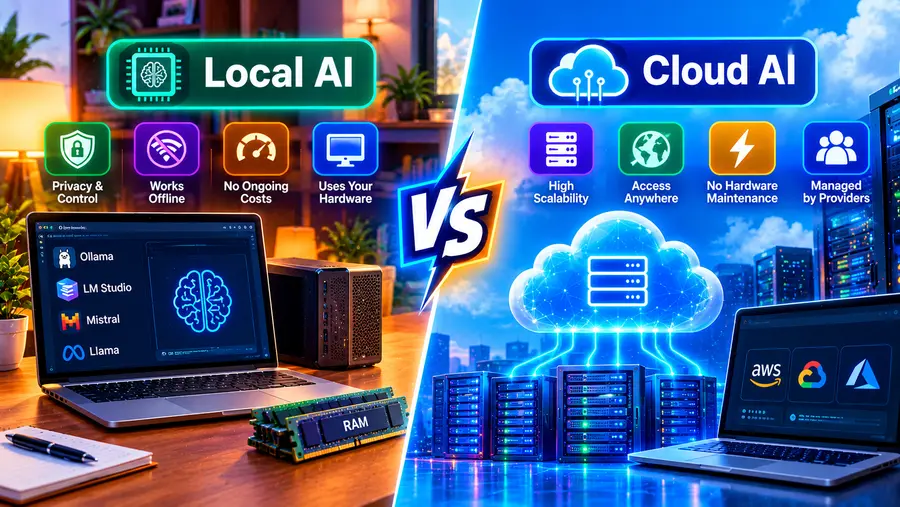
Local AI vs Cloud AI: Quick Answer
The simplest difference is:
Local AI runs the AI model on your own device, while cloud AI runs the model on remote servers accessed through the internet.
| Feature | Local AI | Cloud AI |
| Where processing happens | Your device | Remote data center |
| Internet | Often optional after setup | Usually required |
| Hardware | Your responsibility | Provider’s responsibility |
| Privacy control | Greater local control | Depends on provider |
| Setup | More technical | Usually easier |
| Model size | Limited by hardware | Can access large models |
| Speed | Depends on your hardware | Depends on service/network |
| Cost | Hardware + electricity | Subscription/API usage |
| Offline operation | Possible | Usually unavailable |
| Scalability | Limited by your hardware | Highly scalable |
| Customization | Often extensive | Depends on provider |
| Maintenance | You manage it | Provider manages infrastructure |
What Is Local AI?
Local AI refers to AI models that perform inference directly on your own hardware.
For example, you can install software such as Ollama or LM Studio, download a compatible language model and run it on your PC.
The basic process looks like this:
Your prompt → Local AI software → Model on your PC → Response
Your computer provides the resources needed to process the model.
Depending on the model and software, local AI can use:
- CPU
- GPU
- GPU VRAM
- System RAM
- NPU
- SSD storage
Local AI isn’t limited to PCs. Models can also run on certain smartphones, Macs, servers, edge devices and other computing platforms.
What Is Cloud AI?
Cloud AI runs AI models on remote computing infrastructure.
Instead of downloading and loading the model on your computer, you interact with an online service.
The simplified process is:
Your prompt → Internet → Cloud AI infrastructure → Model → Internet → Response
The cloud provider manages the underlying:
- GPUs
- CPUs
- memory
- storage
- networking
- model infrastructure
- software environment
- scaling
This is one reason cloud AI can provide access to models that would be impractical to run on an ordinary PC.
How Does Local AI Work?
Suppose you install a local AI model on your computer.
When you enter:
“Summarize this document.”
the local application loads the relevant model and performs inference using your computer’s available resources.
Depending on your setup, the model may use:
CPU + RAM
or:
GPU + VRAM + RAM
The response is then generated locally.
Once the required software and model files are installed, compatible local AI applications can continue working without an internet connection.
For example, LM Studio documents offline operation for downloaded models, local document processing and its local server.
How Does Cloud AI Work?
With cloud AI, the model typically lives on the provider’s servers.
You send a request through:
- a web application
- mobile application
- API
- software integration
The provider’s infrastructure processes the request and sends the result back.
The major advantage is that you don’t need to own the hardware required to run the model.
This makes cloud AI particularly convenient for users who want powerful AI without configuring a local inference environment.
Local AI vs Cloud AI: Privacy
Privacy is one of the biggest reasons people investigate local AI.
Local AI
When a model runs entirely on your computer, your prompt and documents can potentially remain on that device.
For example, you could process a locally stored document without uploading the document to a cloud AI service.
However, local AI should not automatically be described as completely private.
Your privacy depends on:
- the application
- network connections
- telemetry
- plugins
- integrations
- operating system
- model-serving configuration
- your own security practices
You should check the software’s privacy documentation before assuming that no information leaves your device.
Cloud AI
Cloud AI requires sending some information to a remote service for processing.
The exact data handling depends on the provider and product.
Important questions include:
- Is your data stored?
- For how long?
- Is it used for model training?
- Can employees access it?
- Is encryption used?
- Are enterprise privacy controls available?
- Where is the data processed?
Therefore, “cloud AI is not private” is too broad a statement.
Cloud services can provide sophisticated security and privacy controls, particularly for business and enterprise customers.
The correct approach is to examine the provider’s current privacy policy and terms for the specific service you’re using.
Local AI vs Cloud AI: Cost
Cost is more complicated than simply saying:
Local AI = free
Cloud AI = paid
Both approaches have costs.
Local AI costs
Local AI may involve:
- PC purchase
- GPU
- RAM
- SSD
- electricity
- cooling
- maintenance
- upgrades
If you already own a capable PC, your additional cost may be relatively low.
But buying a powerful GPU specifically for local AI can be expensive.
Cloud AI costs
Cloud AI may involve:
- monthly subscriptions
- API charges
- token-based pricing
- storage
- additional services
- enterprise contracts
The advantage is that you don’t have to purchase the underlying AI hardware.
For occasional use, a cloud service can therefore be more convenient than building a dedicated local AI workstation.
Local AI vs Cloud AI: Hardware Requirements
This is where the difference becomes very obvious.
Local AI
You need hardware capable of running your chosen model.
Important specifications include:
- RAM
- VRAM
- GPU
- CPU
- storage
- memory bandwidth
For many local-AI users, 16GB RAM is a practical starting point, while 32GB provides more headroom.
The exact requirement depends heavily on the model and workload.
Cloud AI
Your computer doesn’t need to run the model itself.
You can often use cloud AI from:
- an inexpensive laptop
- smartphone
- tablet
- office PC
All you need is a compatible application and network connection.
Local AI vs Cloud AI: Performance
Performance depends on what you mean by “performance.”
There are at least three different things to consider:
Response speed
How quickly does the system begin responding?
Generation speed
How many tokens can it generate per second?
Model capability
How capable is the model at the task you’re asking it to perform?
A high-end cloud model may outperform a small local model in complex tasks.
But a powerful local workstation can provide extremely responsive inference with an appropriate model, especially when the model fits efficiently into GPU memory.
Therefore:
Local vs cloud performance isn’t simply a matter of which architecture is faster.
It depends on the hardware, model, network, workload and service.
Local AI vs Cloud AI: Internet Requirements
Local AI
Once you’ve downloaded the application, model and required components, compatible local AI systems can work offline.
This is particularly useful when:
- traveling
- working in remote locations
- dealing with unreliable internet
- processing documents offline
- developing disconnected applications
Cloud AI
Cloud AI generally requires an internet connection because the model runs on remote infrastructure.
If your internet connection goes down, access to the cloud service may also disappear.
Local AI vs Cloud AI: Model Size
One of the biggest advantages of cloud AI is access to large-scale computing resources.
A typical PC might be able to run a small or medium-sized quantized model.
A cloud provider can operate models using large clusters of accelerators and distributed infrastructure.
That means cloud platforms can make extremely large and computationally demanding models available without requiring users to own equivalent hardware.
Local AI is constrained by the resources available on your machine.
Local AI vs Cloud AI: Customization
Local AI can provide significant control over the environment.
Depending on the software and model, you may be able to control:
- model selection
- quantization
- context size
- system prompts
- temperature
- inference parameters
- local APIs
- integrations
- document retrieval
- automation
This makes local AI attractive to developers and advanced users.
Cloud AI can also provide customization, especially through APIs and enterprise platforms, but the amount of control varies by provider.
Local AI vs Cloud AI for Developers
Developers can benefit from both approaches.
Local AI is useful for:
- experimenting with models
- local coding assistants
- offline development
- privacy-sensitive prototypes
- testing inference
- local RAG
- AI application development
- learning LLM infrastructure
Tools such as Ollama provide a local API that applications can use to interact with locally running models.
Cloud AI is useful for:
- production applications
- large-scale inference
- high-capability models
- rapid prototyping
- applications requiring scalable infrastructure
- workloads where managing GPU infrastructure isn’t practical
Local AI vs Cloud AI for Businesses
Businesses need to consider more than model quality.
Important factors include:
- data governance
- security
- compliance
- scalability
- cost
- infrastructure
- integration
- maintenance
- employee productivity
Local AI can be useful when:
- data must remain within controlled infrastructure
- offline operation matters
- the organization has suitable hardware
- predictable local workloads are involved
Cloud AI can be useful when:
- rapid deployment matters
- workloads fluctuate
- large-scale infrastructure is required
- the organization doesn’t want to maintain GPU hardware
Many organizations can also use a hybrid approach.
What Is Hybrid AI?
Hybrid AI combines local and cloud AI.
For example:
Private / simple tasks
↓
Local AI
Complex / large-model tasks
↓
Cloud AI
A business might process sensitive or routine workloads locally while sending appropriate, non-sensitive workloads to cloud models.
A developer might use a local model for coding experiments and a cloud API for production workloads.
Hybrid architectures can therefore provide flexibility rather than forcing organizations to choose only one approach.
Local AI vs Cloud AI for Privacy-Sensitive Documents
Imagine you have a confidential PDF.
Local approach
↓
Local AI
↓
Summary
The document can remain on your device if the software is configured to operate locally.
Cloud approach
↓
Internet
↓
Cloud AI
↓
Summary
The document or relevant content is transmitted to the cloud service.
Neither architecture should be judged solely on this diagram.
Cloud services can offer encryption, access controls and enterprise security features, while local systems still require proper endpoint security.
The important question is:
What data-handling controls does the specific system provide?
Local AI vs Cloud AI for Offline Work
If offline operation is essential, local AI has an obvious architectural advantage.
For example, a field worker could potentially use a local model on a laptop without an active internet connection.
This can be useful for:
- remote locations
- aircraft
- ships
- field research
- industrial environments
- emergency scenarios
- disconnected networks
The model and software must, of course, already be installed and configured.
Local AI vs Cloud AI: Scalability
Cloud AI has a major advantage when workloads change dramatically.
Imagine a website that normally receives:
100 AI requests per hour
but occasionally receives:
100,000 requests per hour.
Scaling that workload locally can require substantial additional infrastructure.
Cloud infrastructure can potentially scale resources according to demand, depending on the service architecture and capacity.
Local AI is much easier to control for predictable workloads but is constrained by the hardware you own.
Local AI vs Cloud AI: Maintenance
Local AI
You may need to manage:
- software updates
- model updates
- GPU drivers
- storage
- hardware failures
- security
- configuration
- backups
Cloud AI
The provider manages most of the underlying infrastructure.
You still need to manage:
- API keys
- application integration
- access controls
- data handling
- costs
- software integration
Cloud AI therefore reduces infrastructure management, but it doesn’t eliminate operational responsibility.
Local AI vs Cloud AI: Security
Security isn’t automatically determined by whether AI is local or cloud-based.
Local AI security depends on:
- device security
- encryption
- user permissions
- network configuration
- software security
- model source
- system updates
Cloud AI security depends on:
- provider infrastructure
- encryption
- identity management
- access controls
- data retention
- compliance
- API security
- account configuration
The right question isn’t:
“Is local AI secure?”
or:
“Is cloud AI secure?”
Instead ask:
“Which architecture provides the security controls required for my specific workload?”
Local AI vs Cloud AI: Energy Consumption
Local AI uses your own hardware, which consumes electricity during inference.
High-performance GPUs can draw substantial power under sustained workloads.
Cloud AI also consumes electricity, but the energy is used in data centers rather than directly on your device.
The actual environmental impact depends on factors such as:
- hardware efficiency
- utilization
- model size
- inference efficiency
- electricity source
- data-center efficiency
- workload volume
Therefore, simply labeling one approach as “green” or “less green” isn’t sufficient without considering the complete workload.
Local AI vs Cloud AI: Which Is Easier?
For most beginners:
Cloud AI is easier to start with.
You generally:
- Create an account.
- Open the application.
- Enter a prompt.
- Receive an answer.
Local AI requires additional steps:
- Check hardware.
- Install local AI software.
- Download a model.
- Configure the model.
- Allocate memory.
- Troubleshoot performance if necessary.
However, once configured, local AI can become straightforward to use.
Local AI vs Cloud AI: Which Should You Use?
Instead of asking which is universally better, match the architecture to the workload.
Local AI may fit when you prioritize:
- offline operation
- local processing
- control over model files
- experimentation
- privacy-sensitive workflows
- predictable workloads
- local development
- reduced dependence on cloud services
Cloud AI may fit when you prioritize:
- ease of use
- access to powerful models
- minimal hardware requirements
- scalability
- rapid deployment
- managed infrastructure
- production workloads
Hybrid AI may fit when:
You need some combination of local control and cloud-scale capabilities.
Local AI vs Cloud AI: Comparison Table
| Factor | Local AI | Cloud AI |
| Setup | More involved | Usually simple |
| Hardware | User provides it | Provider provides it |
| Internet | Often optional | Usually required |
| Privacy control | High potential | Provider-dependent |
| Large models | Hardware-limited | Broad access possible |
| Offline use | Yes, with compatible setup | Usually no |
| Scalability | Hardware-limited | Highly scalable |
| Maintenance | User-managed | Provider-managed |
| Customization | Often high | Varies |
| Upfront cost | Potentially high | Usually low |
| Recurring cost | Electricity/hardware | Subscription/API |
| Deployment | Local | Remote |
| Learning curve | Higher | Lower |
What About ChatGPT, Claude and Other Cloud AI Services?
Services such as ChatGPT and Claude are examples of cloud-based AI services.
You generally don’t download their underlying proprietary models and run them entirely on your own PC.
Instead, your device acts as the interface while the provider’s infrastructure performs the model inference.
By contrast, tools such as Ollama and LM Studio allow users to run compatible downloadable models locally.
This distinction is important:
AI application ≠ AI model
A local AI application can provide the interface and runtime needed to operate a model, while the model itself is a separate component.
Can Local AI Replace Cloud AI?
Not completely for every user or workload.
Local AI is increasingly capable, but cloud AI has significant advantages in areas such as:
- access to very large models
- managed infrastructure
- scalability
- rapid updates
- multimodal services
- enterprise integrations
At the same time, local AI can be valuable for:
- offline operation
- local document processing
- privacy-sensitive workflows
- experimentation
- development
- edge applications
For many users, the future isn’t necessarily local versus cloud.
It may be:
Local + Cloud
The Future: Local AI and Cloud AI Working Together
AI computing is increasingly becoming distributed.
Some workloads can happen:
On-device → Edge → Local server → Cloud
For example:
Smartphone
↓
Local AI
↓
Edge server
↓
Cloud AI
A simple task might be processed directly on a device.
A more demanding task could be sent to a local server.
An extremely complex task could use cloud infrastructure.
This approach can balance:
- latency
- privacy
- cost
- computing power
- availability
- scalability
Frequently Asked Questions
What is the difference between local AI and cloud AI?
Local AI runs the model on your own hardware, while cloud AI processes requests on remote servers operated by an AI provider.
Is local AI more private than cloud AI?
Local AI can provide greater control over data because processing can remain on your device. However, privacy depends on the software, configuration, integrations and security of the system.
Is cloud AI faster than local AI?
Not necessarily. Cloud AI can provide powerful hardware, but network latency also matters. Local AI can be very responsive when a suitable model fits your hardware.
Can local AI work without the internet?
Yes. After the required application, model and components are downloaded, compatible local AI software can operate offline.
Is local AI cheaper than cloud AI?
It depends. Local AI can avoid subscription or per-request API charges, but you pay for hardware, electricity and maintenance. Cloud AI avoids the need to purchase local AI hardware but may involve subscriptions or usage charges.
Does local AI require a powerful GPU?
Not always. Small models can run using a CPU, although GPU acceleration can significantly improve performance for supported workloads.
How much RAM is needed for local AI?
It depends on the model. 16GB is a practical starting point for many users, while 32GB provides more flexibility. Larger models may require substantially more RAM and/or GPU VRAM.
Can cloud AI work offline?
Generally, no. Cloud AI normally requires network access because the model runs on remote infrastructure.
Can I use both local and cloud AI?
Yes. A hybrid approach can use local models for some tasks and cloud models for others.
Which is better for businesses: local AI or cloud AI?
There is no universal answer. The decision depends on data requirements, security, compliance, workload, scalability, hardware costs and operational needs.
Can local AI run ChatGPT?
You cannot simply download and run the proprietary ChatGPT models on your PC. You can instead run compatible downloadable/open-weight models using local AI software.
Final Thoughts
The difference between local AI and cloud AI comes down to where the computation happens and who manages the infrastructure.
With local AI, your computer does the work. You gain greater control over the environment and can potentially operate without an internet connection, but you’re responsible for hardware, software and performance.
With cloud AI, remote infrastructure does the heavy lifting. You get easier access to powerful models and scalable computing, but you depend on the provider’s infrastructure, policies and network connectivity.
For many users, the decision can be summarized like this:
Choose local AI when control, offline operation and local processing are important. Choose cloud AI when convenience, powerful models and scalability are priorities. Use a hybrid approach when you need both.
The best architecture ultimately depends on your model, workload, budget, privacy requirements and hardware.
Read Here: How to Run AI Models Locally on a PC