DNS Over HTTPS (DoH): Understand How It Works, Benefits & How to Enable It
DNS over HTTPS (DoH) is a technology that encrypts DNS queries by sending them through an HTTPS connection. It helps protect the domain names you look up from being easily monitored or modified by people on the network between your device and the DNS resolver.
Every time you visit a website, your browser needs to find the server’s IP address. It usually does this by asking a DNS resolver to translate the website’s domain name, such as example.com, into an IP address.
With traditional DNS, these queries are often transmitted without encryption. Someone monitoring the network may be able to see which domains your device is looking up.
DNS over HTTPS adds an important layer of privacy by encrypting the connection used for those lookups.
But does DoH make your internet activity completely private? Not quite. It protects DNS traffic in transit, but it does not hide every part of your online activity or prevent websites from tracking you.
In this guide, we’ll explain what DNS over HTTPS is, how it works, its benefits and limitations, how it differs from DNS over TLS and VPNs, and how to enable it in Chrome, Firefox and Windows 11.
Quick Answer: What Is DNS Over HTTPS?
DNS over HTTPS, or DoH, is a protocol that sends DNS queries and responses through an encrypted HTTPS connection. It makes DNS lookups harder for network observers to read or manipulate while the queries travel between your device and the DNS resolver.
Here are the key points:
- Purpose: Encrypt DNS queries and responses in transit.
- Main benefit: Improve privacy and protect against certain forms of DNS interception and manipulation.
- How it works: Carries DNS messages inside HTTPS requests.
- Common applications: Web browsers, operating systems and other internet-enabled applications.
- Limitations: The chosen DNS resolver can still see the queries it receives, and DoH does not encrypt all internet traffic.
- Examples of providers: Cloudflare, Google Public DNS and other compatible encrypted DNS services.
DoH is standardized in RFC 8484, published by the Internet Engineering Task Force (IETF).
What Is DNS and Why Does It Matter?
Before understanding DoH, it helps to understand ordinary DNS.
DNS stands for Domain Name System. It acts like an internet directory, connecting human-readable domain names with IP addresses that computers use to communicate.
For example, you may type:
www.example.com
into your browser.
Your device needs the corresponding IP address before it can establish a connection to the website’s server. A DNS resolver helps find that address.
The basic process looks like this:
You enter a website address
↓
Your device asks a DNS resolver
↓
The resolver finds the IP address
↓
Your browser connects to the website
↓
The website loads
DNS is essential to everyday internet use. Without it, browsing would be much less convenient because you would have to deal with IP addresses instead of familiar domain names.
What is the problem with traditional DNS?
Traditional DNS queries commonly travel over UDP or TCP without transport encryption. This means network operators or other parties with access to the traffic path may be able to inspect the requested domain names.
For example, when you open a news website, a traditional DNS query may reveal the domain being requested even if the website itself uses HTTPS.
Microsoft explains that unencrypted DNS traffic can be monitored and potentially manipulated by parties on the network path.
DNS over HTTPS helps address this particular weakness.
How Does DNS Over HTTPS Work?
DNS over HTTPS changes how DNS queries are transported, rather than replacing the DNS system itself.
Instead of sending the DNS message in an ordinary unencrypted DNS connection, the client sends it within an HTTPS request to a compatible DNS resolver.
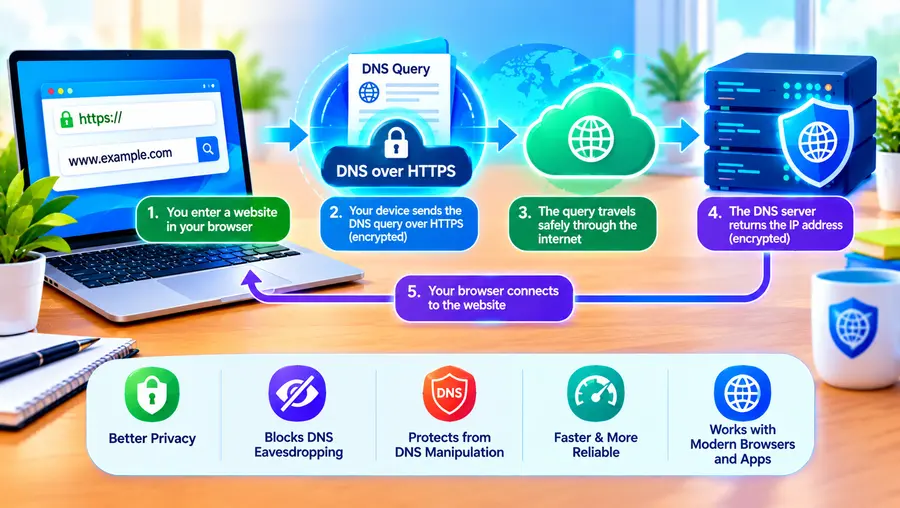
The process generally works like this:
- You enter a website address in your browser.
- Your device needs the IP address associated with that domain.
- A DoH-capable application sends the DNS query over HTTPS to its configured resolver.
- The resolver processes the query and returns a response over the encrypted connection.
- Your browser uses the response to connect to the website.
The simplified process is:
Your browser or device
↓
Encrypted HTTPS
↓
DNS resolver
↓
DNS response
↓
Your browser
HTTPS uses TLS to protect the connection’s confidentiality and integrity and to authenticate the server according to normal HTTPS certificate validation.
This makes DNS queries harder to read or tamper with while they travel across the network.
A practical example
Imagine you’re using public Wi-Fi at an airport.
You enter the address of a banking website. Before your browser can connect, it needs to resolve the site’s domain name.
With traditional unencrypted DNS, someone with access to the network traffic may be able to observe that lookup.
With DoH, the query is carried inside encrypted HTTPS traffic to the configured resolver. A network observer without access to the encrypted connection cannot simply read the DNS request from the traffic.
However, DoH doesn’t guarantee anonymity, and it doesn’t replace the need to verify the banking website’s address and HTTPS connection.
Why Is DNS Over HTTPS Important for Online Privacy?
One of DoH’s main purposes is to make DNS traffic more private.
Without encrypted DNS, a network observer may be able to identify the domain names your device requests.
This can reveal information about your general browsing interests, the services you use or the apps connecting to the internet.
With DoH, DNS queries are encrypted between your device and the selected resolver.
This helps reduce the ability of an internet service provider (ISP), public Wi-Fi operator or another on-path observer to inspect your DNS requests.
However, privacy protection depends on the complete connection, not DNS alone.
Does DoH hide your browsing history from your ISP?
DoH can prevent your ISP from directly reading the DNS queries it transports through an encrypted connection, but it cannot guarantee that your ISP cannot infer which websites you visit.
Your ISP may still observe other information, including destination IP addresses, connection timing and traffic volume. Depending on the connection and protocol, other metadata may also expose information about the destination.
The DNS resolver itself receives your queries and may be able to associate them with your IP address.
This means the choice of DNS provider matters. You should review its privacy policy, logging practices and data-retention policies rather than assuming every DoH provider offers identical privacy.
What Are the Main Benefits of DNS Over HTTPS?
DoH can improve privacy and security in several practical ways.
1. It encrypts DNS queries
DoH protects DNS messages as they travel between the client and the resolver.
This makes it more difficult for ordinary network observers to read those messages directly.
2. It helps prevent DNS tampering
Because HTTPS provides integrity protection and authenticates the resolver’s identity, DoH can help defend against certain forms of DNS manipulation and man-in-the-middle attacks.
It does not eliminate every possible DNS attack or guarantee that the resolver provides accurate information.
3. It works with common internet infrastructure
DoH uses HTTPS and typically communicates through TCP port 443, the standard HTTPS port.
This allows DNS traffic to share infrastructure used by other HTTPS applications. It can make DNS-specific traffic harder to distinguish from ordinary encrypted web traffic, although traffic analysis may still be possible.
4. It can reduce exposure on public Wi-Fi
Public Wi-Fi networks are shared environments.
DoH helps protect DNS requests against direct inspection by others on the network path, making it a useful additional privacy measure when browsing on public connections.
5. It can complement other security tools
DoH can be used alongside HTTPS websites, a VPN, a firewall and other security measures.
These technologies protect different parts of the connection and should not be treated as interchangeable.
What Are the Limitations of DNS Over HTTPS?
DoH is useful, but it is not a complete privacy solution.
Understanding its limitations is important before enabling it.
1. The DNS provider can still see your queries
DoH encrypts the connection between your device and the resolver. The resolver must still process the DNS requests to return answers.
Therefore, your chosen DNS provider may see the domain names you request and may have access to your source IP address.
Its logging and retention policies matter.
2. It does not encrypt all internet traffic
DoH protects the DNS lookup connection, not every connection your device makes.
Your website traffic still needs its own protection, such as HTTPS.
3. It does not hide your identity from websites
Websites can still identify or recognize users through account logins, cookies, browser fingerprinting and other tracking technologies.
DoH does not automatically block these techniques.
4. It does not guarantee anonymity
DoH is an encrypted DNS transport protocol, not an anonymity network.
It does not conceal all connection metadata or prevent all forms of traffic analysis.
5. It may interfere with network filtering
Some organizations, schools, businesses and families use DNS filtering to block malicious domains or enforce access policies.
If an application starts using a different DoH resolver, it may bypass the filtering provided by the network’s default DNS service.
Browsers such as Firefox account for certain managed-network and parental-control situations when deciding whether to activate DoH.
DNS Over HTTPS vs Traditional DNS
The biggest difference is the protection of DNS traffic during transmission.
| Feature | Traditional DNS | DNS over HTTPS |
| DNS transport | Commonly UDP/TCP | HTTPS |
| DNS messages encrypted in transit | Usually no | Yes |
| Standard port | Usually 53 | Typically 443 |
| Can network observers read queries directly? | Often possible | Not from the encrypted DoH connection |
| Resolver can process queries | Yes | Yes |
| Protects all web traffic | No | No |
| Prevents every DNS attack | No | No |
| Can be affected by provider policies | Yes | Yes |
Traditional DNS can work well, but it does not normally provide transport encryption.
DoH adds encryption and authentication to the connection used for DNS resolution.
DNS Over HTTPS vs DNS Over TLS: What’s the Difference?
DNS over HTTPS is not the only way to encrypt DNS traffic.
DNS over TLS (DoT) is another standardized protocol that protects DNS queries using Transport Layer Security.
The key difference is the transport method.
| Feature | DNS over HTTPS (DoH) | DNS over TLS (DoT) |
| Transport | HTTPS | TLS-protected DNS |
| Typical port | 443 | 853 |
| Encrypted DNS queries | Yes | Yes |
| Common use | Browsers, devices and apps | Operating systems, devices and network resolvers |
| DNS traffic mixes with ordinary HTTPS | Often, on port 443 | Uses a dedicated standard port |
| Privacy depends on resolver | Yes | Yes |
DoT commonly uses TCP port 853, while DoH uses HTTPS. Both can provide encryption and authentication between the client and the resolver when correctly configured.
Neither automatically hides your browsing activity from every observer.
DNS Over HTTPS vs VPN: Which Is More Private?
DoH and VPNs solve different problems.
A VPN (Virtual Private Network) creates an encrypted connection between your device and a VPN server, through which traffic covered by the VPN is routed.
DoH encrypts DNS queries between your device and its selected DNS resolver.
| Feature | DNS over HTTPS | VPN |
| Encrypts DNS queries in transit | Yes | Depends on VPN and DNS configuration |
| Routes general internet traffic through a tunnel | No | Generally, yes, for covered traffic |
| Hides destination IPs from your local network observer | Not by itself | Can hide ultimate destinations beyond the VPN server, depending on routing |
| DNS provider can see queries | Yes | The configured DNS resolver may see them |
| Replaces HTTPS | No | No |
| Changes apparent public IP address | No | Generally, yes when traffic exits through the VPN |
| Provides anonymity automatically | No | No |
Which should you choose?
If your main goal is to protect DNS queries from local-network inspection, DoH can help.
If you want to route internet traffic through a VPN tunnel, a VPN may be more appropriate.
Some VPNs already use their own DNS service. If you use a VPN, check whether enabling a separate DoH provider could conflict with the VPN’s DNS or leak-protection settings.
The right configuration depends on your privacy goals and how your software handles DNS.
DNS Over HTTPS vs DNSSEC: Are They the Same?
No. They address different security problems.
DoH encrypts the transport between the client and the DNS resolver.
DNSSEC helps authenticate DNS data, allowing validating resolvers to check cryptographic signatures associated with DNS records.
For example, DoH can protect a query from being read or modified in transit. DNSSEC can help a validating resolver detect certain forms of forged DNS data.
Microsoft describes DNS encryption and DNSSEC as complementary technologies that protect against different threats.
A service can support DoH without every DNS answer being protected by DNSSEC. Likewise, DNSSEC does not itself encrypt a DNS query.
How to Enable DNS Over HTTPS in Google Chrome
Google Chrome includes a feature called Use Secure DNS.
Google’s current documentation says Secure DNS is enabled by default in automatic mode in supported desktop configurations. In that mode, Chrome can fall back to unencrypted DNS if it encounters problems. You can select a custom provider to use a specific service.
Follow these steps on your computer.
Step 1: Open Chrome settings
Open Google Chrome and click the three-dot menu in the upper-right corner.
Choose Settings.
Step 2: Go to security settings
Select:
Privacy and security → Security
Step 3: Find Secure DNS
Scroll down to the section labelled Advanced and find Use Secure DNS.
Step 4: Choose a provider
Turn the feature on, then select a DNS service from the available choices.
Depending on your setup, Chrome may show your current provider or let you select a compatible custom provider.
Step 5: Test your connection
Open a few websites you use regularly.
If you experience DNS errors, check whether the provider is working and whether a network policy, VPN or parental-control system is affecting the connection.
Important: If you keep Chrome’s automatic provider setting, fallback behaviour can mean that some queries are sent without encryption. Selecting a custom provider changes this behaviour, according to Google’s documentation.
How to Enable DNS Over HTTPS in Mozilla Firefox
Firefox offers more detailed DoH protection settings.
Mozilla’s current interface includes different protection levels, allowing you to decide how Firefox handles secure DNS and what happens if the chosen resolver is unavailable.
Step 1: Open Firefox settings
Open Firefox, click the menu button and select Settings.
Step 2: Open Privacy & Security
Choose Privacy & Security from the left-hand menu.
Step 3: Find DNS over HTTPS
Scroll down to the DNS over HTTPS section.
Depending on your Firefox version, you may see an option to open advanced settings.
Step 4: Choose a protection level
Firefox documents several modes:
- Default Protection: Firefox uses its default secure-DNS behaviour and may fall back when needed.
- Increased Protection: DoH is active with your selected provider, with backup behaviour if issues occur.
- Max Protection: Firefox prioritizes secure DNS and shows a warning if it cannot resolve a domain through the selected service.
- Custom Protection: Lets you select a DoH provider and configure protection behaviour.
- Off: Uses the default DNS resolver without Firefox’s DoH protection.
The exact options and labels can vary by version and environment.
Step 5: Choose the option that fits your needs
If privacy is your main concern, review the behaviour of Increased or Max Protection.
If you rely on a corporate network, parental controls or local DNS filtering, check whether changing Firefox’s setting could interfere with those services.
How to Enable DNS Over HTTPS in Windows 11
Windows 11 supports encrypted DNS configuration for compatible DNS servers.
The precise interface can vary depending on your Windows version and network configuration. Microsoft’s current instructions cover setting DNS manually for an IPv4 or IPv6 connection and specifying whether DNS should be encrypted.
Step 1: Open network settings
Open:
Settings → Network & internet
Choose your connected Wi-Fi or Ethernet network.
Step 2: Edit DNS settings
Find the DNS server assignment section and click Edit.
Choose Manual if required.
Step 3: Enter a compatible DNS server
Enable IPv4 or IPv6 as appropriate.
Enter the preferred and alternate addresses for a DNS provider that supports DoH.
Don’t enter arbitrary addresses. Use the official configuration information supplied by the DNS provider.
Step 4: Select encrypted DNS
For DNS over HTTPS, choose an available option such as:
- On (automatic template)
- On (manual template)
The options shown depend on the resolver and Windows configuration.
Step 5: Consider fallback behaviour
Windows also provides a choice about falling back to unencrypted DNS if a secure connection cannot be used.
- Fallback enabled: DNS may be sent unencrypted when encrypted DNS is unavailable.
- Fallback disabled: DNS queries may fail rather than being sent unencrypted.
Disabling fallback offers a stricter encryption policy, but it can cause name resolution to fail if the selected DoH service is unavailable or incorrectly configured.
Note: Microsoft’s current instructions state that the native Windows DNS-over-HTTPS setting described here is not available in Windows 10. That does not mean Windows 10 applications cannot use DoH independently.
Which DNS Over HTTPS Provider Should You Use?
Several providers offer encrypted DNS services.
Your best choice depends on what you value: privacy policy, content filtering, security features, performance or compatibility.
Examples include:
Cloudflare 1.1.1.1
Cloudflare offers a public DNS resolver and documents its privacy practices for that service. Review its current 1.1.1.1 privacy documentation before using it.
Google Public DNS
Google Public DNS also supports DNS over HTTPS. Its official documentation explains how DoH requests are sent to the service.
Other compatible providers
There are other DoH-compatible DNS services, including providers that offer domain filtering or protection against known malicious domains.
Before choosing one, consider:
- Does it support DoH on your device?
- What data does it log?
- How long is the data retained?
- Does it offer content filtering?
- Is it suitable for your household or workplace?
- Does its privacy policy match your expectations?
Remember that switching to a different DNS provider changes who processes your queries. Encryption alone does not make a provider trustworthy.
Does DNS Over HTTPS Make Your Internet Faster?
Not necessarily.
DoH primarily improves the privacy and integrity of DNS queries. It is not mainly designed as an internet-speed booster.
Your browsing experience may become faster, slower or remain almost unchanged depending on:
- DNS provider performance
- network latency
- DNS caching
- existing resolver performance
- connection reuse
- device configuration
If your current DNS service responds quickly, enabling DoH may not make a noticeable difference in page-loading speed.
If your existing resolver is slow, a different DNS provider could improve lookup times, but the benefit comes from the resolver and network conditions—not from encryption automatically making the internet faster.
Can DNS Over HTTPS Block Ads or Malware?
Not by itself.
DoH is a transport protocol, not an advertising blocker or antivirus system.
However, some DNS providers offer filtering that blocks requests to certain domains associated with advertising, trackers or known malicious activity.
If you use one of these services over DoH, you may receive both encrypted DNS transport and DNS-level filtering.
These are separate functions:
- DoH: Encrypts the DNS connection.
- DNS filtering: Decides whether certain domains should resolve.
- Antivirus/security software: Provides other forms of detection and protection.
DNS filtering can reduce exposure to some harmful domains, but it cannot stop every phishing attack, malware infection or form of tracking.
Can DNS Over HTTPS Bypass Website Blocks?
DoH can sometimes bypass DNS-based blocking if a network blocks a domain through its normal DNS resolver and your device switches to an external DoH resolver.
However, DoH is not a guarantee that a blocked website will become accessible.
Networks can use other blocking methods, including IP-based filtering, application controls or restrictions at the network gateway.
Also, bypassing a block may conflict with workplace, school, household or local network rules.
Use encrypted DNS in a way that respects applicable policies and regulations.
Is DNS Over HTTPS Safe?
Generally, DoH is a useful security improvement when it is correctly configured and uses a trustworthy resolver.
It protects DNS messages in transit and makes certain forms of inspection and manipulation more difficult.
But its overall value depends on the wider setup.
Consider these points:
- Choose a provider with a clear privacy policy.
- Keep your browser and operating system updated.
- Continue using HTTPS websites.
- Be careful with unknown DNS providers.
- Check that DoH does not interfere with required security or filtering policies.
- Understand whether the application can fall back to unencrypted DNS.
DoH also does not validate every DNS response by itself in the way DNSSEC does. The two protocols address different threats and can be complementary.
When Should You Enable DNS Over HTTPS?
DoH may be particularly useful if you:
- Use public Wi-Fi regularly
- Want to reduce exposure of DNS queries to network observers
- Prefer encrypted DNS communication
- Need to protect lookups on untrusted networks
- Want to choose a DNS resolver with a privacy policy you trust
You may need additional consideration if you:
- Use a corporate network with managed DNS
- Depend on parental-control DNS filtering
- Use a VPN with its own DNS settings
- Need internal company domain names to resolve correctly
- Rely on a network security system that inspects DNS
For managed devices, follow the relevant IT or network administrator’s instructions.
Common DNS Over HTTPS Problems and How to Fix Them
Websites won’t load after enabling DoH
Your selected DNS resolver may be unavailable, incorrectly configured or blocked by the network.
Try this: Check the provider selection, confirm the resolver is operating, and temporarily revert to the previous setting if needed.
Some websites work, but internal websites don’t
Corporate networks often use internal DNS names or special DNS policies.
Try this: Check your organization’s DNS requirements before choosing a third-party resolver.
Parental controls stop working
A browser or system using another DNS resolver may bypass the filtering provided by your usual network DNS service.
Try this: Review the parental-control settings and use a compatible DNS configuration.
DNS errors appear when the secure resolver is unavailable
A strict DoH configuration may fail rather than fall back to unencrypted DNS.
Try this: Verify the resolver address and network connection. If you enable fallback, understand that affected lookups may no longer be encrypted.
DoH appears enabled, but you are unsure whether it’s active
The setting may use an automatic mode, or the browser may be following network policies.
Try this: Review the browser or operating-system status and the provider configuration. Avoid relying only on an enabled toggle as proof that every DNS query is encrypted.
Frequently Asked Questions
What does DNS over HTTPS mean?
DNS over HTTPS means sending Domain Name System queries and responses over an encrypted HTTPS connection instead of using traditional unencrypted DNS transport. It improves DNS privacy and protects the connection against certain forms of interception and manipulation.
Is DNS over HTTPS better than normal DNS?
DoH provides transport encryption and authentication that traditional unencrypted DNS usually lacks. However, the best configuration depends on your DNS provider, network requirements and privacy goals.
Does DNS over HTTPS hide my browsing history from my ISP?
It can prevent your ISP from directly reading DNS queries carried through an encrypted DoH connection. However, your ISP may still infer website activity from destination IPs or other traffic metadata. The DoH provider itself can see the queries it receives.
Is DNS over HTTPS the same as a VPN?
No. DoH encrypts DNS queries between your device and its resolver. A VPN routes covered network traffic through an encrypted tunnel to a VPN server. Neither guarantees complete anonymity.
Does DNS over HTTPS slow down internet speed?
Not necessarily. Performance depends on resolver location, latency, caching, network quality and configuration. DoH is primarily a privacy and security technology rather than a speed-enhancement tool.
Which is better: DNS over HTTPS or DNS over TLS?
Both can encrypt DNS queries. DoH uses HTTPS, typically on port 443, whereas DoT commonly uses port 853. The better choice depends on device support, provider compatibility and network configuration.
Is DNS over HTTPS available in Chrome?
Yes. Chrome supports Secure DNS, which uses encrypted DNS when available. You can manage it through Settings → Privacy and security → Security → Use Secure DNS.
Does Firefox support DNS over HTTPS?
Yes. Firefox includes configurable DNS-over-HTTPS protection levels under Settings → Privacy & Security.
Does Windows 11 support DNS over HTTPS?
Yes. Windows 11 supports configuring compatible DNS servers to use DoH through network settings, including automatic and manual templates.
Can DNS over HTTPS block malware?
DoH alone does not block malware. A DNS provider may offer separate filtering features that prevent lookups for certain malicious domains, but these do not replace antivirus or other security measures.
Should I enable DNS over HTTPS?
For many personal devices, DoH is a useful privacy enhancement. Before enabling it, make sure the DNS resolver is trustworthy and that the configuration doesn’t interfere with essential network services, parental controls or workplace policies.
Final Thoughts
DNS over HTTPS protects DNS queries by sending them through an encrypted HTTPS connection. It makes it harder for network observers to read or modify those queries while they travel between your device and the DNS resolver.
DoH can be valuable on public Wi-Fi and other networks where DNS privacy matters. It is supported by modern browsers such as Chrome and Firefox and can also be configured at the operating-system level in Windows 11.
However, DoH is not a VPN, an antivirus program or a complete anonymity solution. Your resolver still processes the DNS queries it receives, and other connection information may reveal aspects of your browsing activity.
The best approach is to use a trustworthy DNS provider, enable encrypted DNS where appropriate, and combine it with HTTPS, updated software and sensible security practices.