Difference Between DNS over HTTPS (DoH) and DNS over TLS (DoT)
DNS over HTTPS (DoH) and DNS over TLS (DoT) are two technologies that encrypt DNS queries to improve online privacy and security. The main difference is how they transport DNS requests and responses.
DNS over HTTPS sends DNS messages through an encrypted HTTPS connection, typically using port 443. DNS over TLS protects DNS messages using TLS over a dedicated connection, which normally uses TCP port 853.
Both technologies make it harder for network observers to read or modify DNS queries while they travel between your device and the DNS resolver.
But which one is better? Should you use DNS over HTTPS or DNS over TLS on your computer or smartphone?
The answer depends on your device, privacy requirements, network setup and the DNS provider you trust.
In this guide, you’ll learn the difference between DoH and DoT, how each protocol works, their advantages and limitations, and which one makes more sense for your everyday internet use.
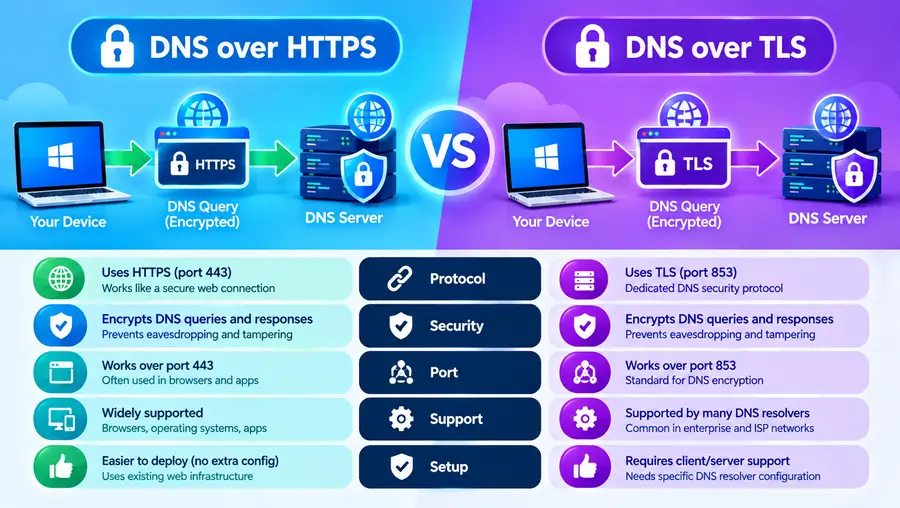
Quick Answer: DNS over HTTPS vs DNS over TLS
The easiest way to understand the difference is:
- DNS over HTTPS (DoH): Sends DNS queries and responses through HTTPS, typically over port 443.
- DNS over TLS (DoT): Sends DNS queries and responses through a TLS-encrypted connection, normally over TCP port 853.
Both are designed to protect DNS traffic between your device and the resolver.
| Feature | DNS over HTTPS (DoH) | DNS over TLS (DoT) |
| Full name | DNS over HTTPS | DNS over TLS |
| Main purpose | Encrypt DNS traffic | Encrypt DNS traffic |
| Transport | HTTPS | TLS over TCP |
| Default/common port | 443 | 853 |
| DNS messages encrypted in transit | Yes | Yes |
| Server authentication | Yes, through TLS certificate validation | Yes, through TLS certificate validation |
| Traffic visibility to network observers | Can blend with ordinary HTTPS traffic | Dedicated port makes the connection easier to identify |
| Browser support | Common in modern browsers | Less commonly exposed as a browser-specific setting |
| Operating-system support | Depends on OS and configuration | Available through supported system-level DNS configurations |
| Resolver can see queries | Yes | Yes |
| Hides all browsing activity | No | No |
The protocols provide similar protections for DNS queries in transit. The main distinction is their transport and how the resulting traffic can be managed by network administrators.
What Is DNS?
Before comparing DoH and DoT, let’s understand what DNS does.
DNS stands for Domain Name System. It translates human-readable domain names into IP addresses that computers use to connect to servers.
For example, when you enter a website address into your browser, your device usually needs to look up the corresponding IP address before connecting to the website.
The process looks like this:
You enter a domain name
↓
Your device requests a DNS lookup
↓
A DNS resolver finds the IP address
↓
Your browser connects to the server
↓
The website loads
DNS makes the internet easier to use because you can type a familiar domain name instead of remembering a numerical IP address.
Why can traditional DNS be a privacy problem?
Traditional DNS commonly sends queries without transport encryption.
That means someone monitoring the network path may be able to see which domains your device is requesting.
For example, even if you visit a website that uses HTTPS, the DNS lookup that happens before the connection may still use unencrypted DNS.
DoH and DoT address this problem by encrypting the connection used for DNS lookups.
What Is DNS over HTTPS (DoH)?
DNS over HTTPS is a protocol that sends DNS queries and responses through an HTTPS connection.
The Internet Engineering Task Force standardized DoH in RFC 8484.
Instead of sending a DNS request through a traditional unencrypted DNS connection, your device sends the request as part of an HTTPS exchange with a compatible DNS resolver.
The simplified process looks like this:
Your browser or device
↓
Encrypted HTTPS
↓
DNS resolver
↓
Encrypted response
↓
Your browser or device
Because HTTPS normally uses TCP port 443, DoH can share the same port used by regular HTTPS websites and applications.
Read More: What Is DNS Over HTTPS and How Does It Work?
How does DoH protect your privacy?
Imagine you’re browsing the internet using public Wi-Fi.
With unencrypted DNS, someone monitoring the network may be able to read your domain lookups.
With DoH, the DNS request is encrypted between your device and the resolver. A network observer cannot simply read the domain name from that encrypted exchange.
DoH can also make DNS traffic harder for network devices to distinguish from ordinary HTTPS traffic.
However, this does not make DNS traffic completely invisible. Network observers may still identify the remote IP address, connection timing and other metadata.
Where is DoH commonly used?
DNS over HTTPS is supported by modern web browsers and can also be configured at the operating-system or application level.
Examples include:
- Google Chrome’s Secure DNS feature
- Mozilla Firefox’s DNS over HTTPS settings
- Compatible DNS clients and applications
- Supported operating systems and network configurations
Mozilla’s documentation explains how Firefox encrypts DNS requests through a selected DoH-compatible provider and allows users to configure protection settings.
What Is DNS over TLS (DoT)?
DNS over TLS is a protocol that encrypts DNS queries and responses using Transport Layer Security (TLS).
The IETF standardized DoT in RFC 7858. The specification defines TCP port 853 as the default port for DNS over TLS.
Unlike DoH, which carries DNS messages inside HTTPS exchanges, DoT establishes a TLS-protected connection specifically for DNS traffic.
Its simplified workflow looks like this:
Your device
↓
TLS-encrypted DNS connection
↓
DNS resolver
↓
TLS-encrypted DNS response
↓
Your device
How does DoT protect DNS queries?
DoT encrypts DNS messages while they travel between your device and the configured resolver.
This makes it more difficult for someone monitoring the network to read the requested domain names or modify DNS responses without detection.
The TLS connection also helps authenticate the resolver, provided the client validates the server certificate correctly.
Where is DoT commonly used?
DoT is often available through system-level DNS configurations and dedicated DNS clients.
For example, Android’s built-in Private DNS setting supports encrypted DNS using a provider hostname. Google’s Android documentation recommends keeping Private DNS enabled on supported connections.
DoT is also useful for network administrators who want an identifiable, encrypted DNS service that can be managed through network policies.
What Is the Main Technical Difference Between DoH and DoT?
The biggest difference is how DNS traffic is transported.
DNS over HTTPS
DoH packages DNS messages into HTTPS requests and responses.
This lets DNS traffic use the established HTTPS protocol and, commonly, port 443.
DNS over TLS
DoT establishes a TLS-protected DNS connection, normally using TCP port 853.
It does not need to package the DNS message as an HTTPS request.
Both use TLS-based encryption to protect DNS traffic in transit, but they are different protocols with different connection formats.
Port 443 vs Port 853: Why Does It Matter?
Network ports help computers distinguish between different types of network services.
Port 443 is the standard port for HTTPS traffic.
Port 853 is the default port for DNS over TLS.
This difference affects how the traffic appears to network administrators.
DoH and port 443
DoH commonly uses the same port as regular HTTPS traffic.
As a result, a network observer may find it harder to distinguish DNS requests from other HTTPS exchanges based on the port alone.
This can make DoH more resistant to simplistic port-based blocking, although it does not prevent every form of network detection or policy enforcement.
DoT and port 853
DoT normally uses a dedicated port.
Network administrators can identify and manage connections to port 853 more easily than they can identify individual DoH requests mixed into HTTPS traffic.
Organizations may prefer this predictable behavior when they want to enforce encrypted DNS policies.
Important: These are the default port arrangements, not absolute requirements for every deployment. DoH endpoints and DoT connections can be configured differently when clients and servers support it.
DNS over HTTPS vs DNS over TLS: Which Is More Private?
Both protocols can protect DNS queries from direct inspection while they travel between your device and the resolver.
Neither is automatically more private in every situation.
The privacy you actually get depends on several factors:
- The DNS resolver you select
- The provider’s logging and retention policies
- Whether the client validates the server’s identity
- Whether all relevant applications use encrypted DNS
- Whether the system falls back to unencrypted DNS
- What other network metadata remains visible
Example: Using DoH on public Wi-Fi
Suppose you connect to airport Wi-Fi and use a browser configured to send DNS queries through a trusted DoH provider.
The Wi-Fi operator cannot simply read the domain names from the encrypted DoH messages. However, the operator may still observe the destination IP addresses of your connections and other metadata.
Example: Using DoT on an Android phone
Suppose you configure Android Private DNS to use a compatible encrypted DNS provider.
Your device can use DoT to protect system DNS queries from direct observation on the network path.
The resolver still receives the DNS requests, and the exact protection depends on your configuration and whether applications use the system resolver or their own DNS settings.
The practical lesson is simple: both protocols improve DNS privacy, but neither makes you anonymous online.
Does the DNS Provider Still See Your Queries?
Yes.
This is one of the most important points to understand about encrypted DNS.
DoH and DoT encrypt the connection between your device and the resolver. The resolver itself must process your DNS request to return the requested information.
Therefore, the resolver may see:
- The domain you requested
- The time of the request
- Your source IP address or other connection information
- Other metadata available to that service
What the provider stores, for how long and how it uses the information depends on its policies and implementation.
That’s why choosing a trustworthy DNS provider matters just as much as enabling encryption.
Encryption protects the connection; it does not prevent the endpoint from seeing the data it receives.
DNS over HTTPS vs DNS over TLS: Which Is Faster?
There is no universal speed winner.
The performance of DoH and DoT depends on:
- DNS provider location
- Network latency
- Connection setup and reuse
- DNS caching
- Internet connection quality
- Client and server implementation
- Existing network configuration
Both protocols can perform efficiently when connections are reused and the resolver is well connected.
If a provider is geographically closer to you or has a faster infrastructure, it may provide quicker DNS responses regardless of whether you choose DoH or DoT.
Does encryption slow down DNS?
Encryption introduces some computational and connection overhead, but the practical impact varies.
For many everyday users, differences may be small or difficult to notice. The protocol alone is not enough to predict which service will be faster on a particular connection.
If speed matters, compare the DNS providers under your actual network conditions rather than assuming one protocol is always faster.
DoH vs DoT: Which Is Better for Browsers?
For browser-specific encrypted DNS, DoH is often the more convenient option because modern browsers commonly expose it through their security settings.
For example, Chrome offers a Secure DNS setting, and Firefox provides configurable DoH protection levels.
This allows the browser to use a compatible encrypted DNS resolver, even when the operating system’s normal DNS configuration is different.
However, this can create complications for managed networks, internal websites or parental-control systems that depend on the operating system’s configured DNS resolver.
If you’re using a work computer or a school network, check the relevant policies before changing these settings.
DoH vs DoT: Which Is Better for Smartphones?
It depends on the operating system and the DNS client.
Android
Android provides a built-in Private DNS setting that supports encrypted DNS through a provider hostname. The native feature commonly uses DNS over TLS.
This makes DoT a practical system-level option on supported Android devices.
Some browsers and third-party applications may offer their own DoH settings, so a device can potentially use different DNS configurations for different applications.
iPhone and iPad
The exact options depend on iOS or iPadOS version, installed configuration profiles and the DNS application being used.
Some configurations support encrypted DNS through DoH or DoT, but a user-facing setting identical to Android’s Private DNS is not universally available in all iOS configurations.
Check Apple’s current documentation or your DNS provider’s setup guide for the relevant device and software version.
Windows
Windows 11 supports encrypted DNS configuration for compatible DNS servers, including DoH. The available settings depend on the DNS provider and system configuration.
For most nontechnical users, the easiest option is to use a supported operating-system or browser setting rather than manually configuring network protocols.
Can DoH and DoT Both Be Used on the Same Device?
Yes.
A device can support different encrypted DNS methods for different applications or network configurations.
For example:
- A browser may use DoH.
- The operating system may use DoT.
- A separate application may use its own DNS resolver.
However, whether these configurations operate simultaneously depends on the software and network setup.
If the browser sends its queries directly to one resolver while the operating system uses another, your DNS requests may be handled by two different providers.
This matters if you want consistent privacy policies, parental controls or internal network access.
It is worth checking the DNS settings of both your browser and operating system.
DoH vs DoT vs DNSSEC: What’s the Difference?
These technologies serve related but different purposes.
| Technology | Main purpose | Encrypts DNS traffic? |
| DNS over HTTPS (DoH) | Protects DNS queries through HTTPS | Yes |
| DNS over TLS (DoT) | Protects DNS queries through TLS | Yes |
| DNSSEC | Helps validate the authenticity of DNS data | No |
DNSSEC adds cryptographic validation to DNS data so a validating resolver can detect certain forms of forged or altered DNS information.
DoH and DoT protect the transport between your device and its resolver.
These approaches can complement one another, but none should be treated as a complete security solution on its own.
DoH vs DoT vs VPN: Which Should You Use?
A VPN and encrypted DNS solve different problems.
A VPN creates an encrypted tunnel for the network traffic routed through it. DoH and DoT encrypt DNS communication between your device and the resolver.
| Feature | DoH | DoT | VPN |
| Encrypts DNS connection | Yes | Yes | Depends on the VPN’s DNS configuration |
| Routes general traffic through an encrypted tunnel | No | No | Generally, yes |
| Can hide DNS messages from local-network observers | Yes | Yes | Depends on DNS routing and configuration |
| Resolver still processes queries | Yes | Yes | The configured DNS resolver still processes queries |
| Changes your public exit IP | No | No | Generally, yes |
| Automatically makes you anonymous | No | No | No |
For ordinary browsing, DoH or DoT can provide useful DNS privacy.
If you also want to route your covered internet traffic through a VPN server, a VPN may be appropriate. Review the VPN’s DNS handling and leak-protection settings so that separate DNS configurations do not undermine your intended setup.
How to Enable DNS over HTTPS
DoH can commonly be enabled through browser or operating-system settings.
In Google Chrome
- Open Chrome settings.
- Go to Privacy and security.
- Open Security.
- Find Use Secure DNS.
- Select the available setting and, if needed, choose a compatible DNS provider.
Chrome’s available choices and fallback behavior can depend on the browser version and configuration. See the official Chrome instructions.
In Mozilla Firefox
- Open Firefox settings.
- Select Privacy & Security.
- Find the DNS over HTTPS section.
- Choose the protection level and resolver that suit your needs.
Firefox provides more than one protection mode, including choices that determine how it behaves when secure DNS is unavailable. Review the official Firefox guide.
How to Enable DNS over TLS on Android
Android’s built-in Private DNS feature is a convenient way to configure DoT.
The exact menu labels may vary by phone manufacturer.
- Open Settings.
- Select Network & internet.
- Tap Private DNS.
- Choose Private DNS provider hostname if you want to specify a provider.
- Enter the hostname supplied by your chosen encrypted DNS provider.
- Save the setting and check that websites still load correctly.
Google’s Android Help guide provides the current steps for managing Private DNS.
Use the provider hostname, not an arbitrary IP address. If the configuration fails, return to the previous setting and check the provider’s setup instructions.
Can DoH or DoT Bypass Website Blocks?
Sometimes, but not always.
If a network blocks a domain solely through its default DNS resolver, switching to an external encrypted DNS resolver can prevent that particular DNS-based block from being applied.
However, networks can also block access using IP addresses, firewalls, application policies and other techniques.
Encrypted DNS may also interfere with security filtering, parental controls or corporate network policies.
Use an appropriate configuration for your situation and follow the rules that apply to your device and network.
Common Problems With Encrypted DNS
Some websites stop working
The chosen resolver may be unavailable, incorrectly configured or blocked by your network.
What to do: Check the hostname or provider settings and temporarily return to the previous configuration if necessary.
Internal work websites stop resolving
Your organization may use internal DNS records that an external public resolver cannot find.
What to do: Use the DNS configuration recommended by your IT administrator. Some browsers and managed configurations support domain exclusions or fallback behavior.
Parental controls no longer work
Your browser or device may be using a resolver that doesn’t apply the filtering rules provided by your network.
What to do: Check your family-safety settings and configure a compatible encrypted DNS service.
Secure DNS appears enabled, but you are unsure whether it is being used
An enabled setting does not necessarily prove that every application uses the same encrypted resolver. Some configurations also permit fallback to ordinary DNS.
What to do: Check the actual browser and system settings, including fallback behavior, and verify the provider configuration.
The internet seems slower
A distant resolver, connection problem or configuration issue may cause slower lookups.
What to do: Check your network, try a reliable compatible provider and compare performance rather than assuming DoH or DoT is inherently slower.
Frequently Asked Questions
What is the main difference between DNS over HTTPS and DNS over TLS?
DNS over HTTPS sends DNS queries through HTTPS, typically on port 443. DNS over TLS uses a TLS-encrypted DNS connection, normally on TCP port 853. Both protect DNS messages in transit.
Is DoH more secure than DoT?
Neither protocol is universally more secure. Both can provide encryption, integrity protection and server authentication when configured correctly. The provider, client configuration and wider security setup also matter.
Is DNS over TLS more private than DNS over HTTPS?
Not inherently. Both protect DNS queries between your device and the resolver. DoH traffic commonly blends with HTTPS traffic, while DoT normally uses a recognizable dedicated port, but the privacy of both depends on the resolver and configuration.
Which is better: DoH or DoT?
DoH is convenient for browser-specific settings and uses standard HTTPS transport. DoT is useful for system-level encrypted DNS and provides a dedicated transport that is easier for administrators to identify. The better choice depends on your device and network.
Does DoH use port 443?
Yes, DoH commonly uses HTTPS on port 443, although specific endpoints can use other configurations when supported.
Does DoT use port 853?
Yes. TCP port 853 is the default port specified by the DoT standard, although clients and servers can use a different port when configured to do so.
Can I use DoH and DoT together?
Yes. A browser may use DoH while the operating system uses DoT. However, the exact behavior depends on the software and configuration, and different applications may use different DNS providers.
Does DoH or DoT hide my browsing history from my ISP?
Both can hide DNS queries from direct inspection while they travel through the encrypted connection. However, an ISP may still infer activity from IP addresses and traffic metadata, and the DNS resolver can see the queries it receives.
Which is better for Android: DoH or DoT?
Android’s built-in Private DNS feature provides DoT on supported devices, making it a practical system-level option. Some browsers and applications also offer DoH. Choose the option that fits your device, privacy needs and network configuration.
Do DoH and DoT make a VPN unnecessary?
Not necessarily. They protect DNS queries, while a VPN routes covered network traffic through an encrypted tunnel. They offer different forms of protection and can be used together when configured properly.
Do DoH and DoT make the internet faster?
Not automatically. Performance depends on resolver response time, network latency, caching, connection reuse and implementation. Either method can be fast when configured well.
Is DNSSEC the same as DoH or DoT?
No. DNSSEC helps validate DNS data, while DoH and DoT encrypt DNS traffic in transit. They address different security concerns and can complement each other.
Final Thoughts
DNS over HTTPS and DNS over TLS both protect DNS queries through encryption, but they use different transport methods.
DoH carries DNS messages through HTTPS, typically over port 443. DoT uses TLS-protected DNS connections, normally over TCP port 853.
For many everyday users, DoH is convenient for browser-level encrypted DNS, while DoT is useful for system-level configurations such as Android Private DNS.
Neither protocol is automatically more private in every situation. Your choice should depend on device compatibility, network policies, the DNS provider’s privacy practices and whether you need browser-level or system-wide protection.
The most important takeaway is simple:
Choose a trustworthy DNS resolver and use properly configured encrypted DNS. DoH and DoT can both improve privacy, but neither replaces HTTPS, a VPN when needed, or good security practices.