Agentic SRE on AWS uses AI-powered agents to detect, analyze, and resolve incidents automatically. It combines services like Amazon Web Services CloudWatch, Lambda, Bedrock, and Systems Manager to create self-healing workflows. When an outage or anomaly appears, AI agents investigate logs, identify root causes, trigger remediation scripts, and notify teams in real time. This reduces downtime, improves reliability, and helps businesses respond to incidents faster without constant manual intervention.
Stop waking up at 2 AM for minor alerts. Master AWS Agentic SRE implementation. Connect CloudWatch, EventBridge and Amazon Bedrock to build highly secure, autonomous AI incident responders.
How to Implement Agentic SRE on AWS for Autonomous Incident Response: Step-by-Step Guide
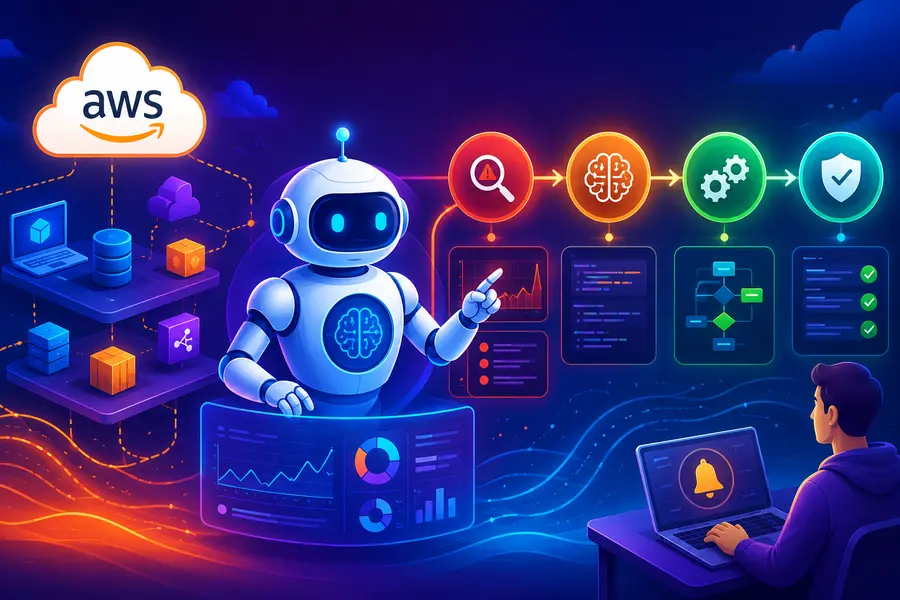
To implement Agentic Site Reliability Engineering (SRE) on AWS, configure Amazon CloudWatch composite alarms to route through EventBridge, triggering an AWS Step Functions state machine. Use Amazon Bedrock as the reasoning engine. Equip the Bedrock agent with AWS Lambda functions as strict, read-only tools to autonomously query logs, diagnose root causes, and propose mitigation plans.
Introduction: The Shift from Automated to Agentic SRE
For years, DevOps and platform engineering teams have relied on automated runbooks. Automation follows a strict “If X happens, do Y” logic. But production environments are rarely that simple.
A sudden spike in API latency could be caused by a noisy neighbor in a Kubernetes cluster, a bad code deployment, or a database read-capacity limit. Traditional automation fails here because it cannot reason; it can only execute.
An Artificial Intelligence Site Reliability Engineer (AI SRE) changes this paradigm. An AI SRE is an autonomous AI agent that detects, investigates, and resolves production incidents without requiring constant human intervention.
Instead of waking up at 2 AM to manually correlate telemetry from multiple sources and trace dependencies, an on-call engineer wakes up to a completed root cause analysis and a proposed fix.
The shift to agentic systems is driven by the need to handle complex, cross-domain reasoning. Today, an autonomous agent can trace dependencies across your services, correlate telemetry with recent code deployments, and form hypotheses in minutes—a process that routinely takes human engineers hours.
Early deployments of these systems have shown a reduction in Mean Time to Resolution (MTTR) by up to 75%, boasting a 94% accuracy rate in identifying root causes.
Learn how to build a highly secure, custom Agentic SRE architecture using Amazon Bedrock, AWS Step Functions, and AWS Lambda.
The AWS Agentic Architecture (The “Brain and Hands” Model)
To build a reliable autonomous SRE, we must separate the system into distinct operational layers. The AI should never have direct access to your infrastructure. Instead, it operates using a “Brain and Hands” model.
The architecture relies on specific AWS services mapped to agentic functions:
| Agentic Function | AWS Service | Role in the SRE Workflow |
| Observability (The Eyes) | Amazon CloudWatch | Detects anomalies across logs, metrics, and traces, firing composite alarms. |
| Event Routing (The Nervous System) | Amazon EventBridge | Captures the alarm state changes and routes the JSON payload to the orchestrator. |
| Reasoning Engine (The Brain) | Amazon Bedrock (AgentCore) | Analyzes the incident context, builds an application topology graph, and plans diagnostic steps. |
| Tool Execution (The Hands) | AWS Lambda | Isolated Python/Node.js scripts the LLM triggers to execute specific actions (e.g., querying databases). |
| Orchestration (The Manager) | AWS Step Functions | Manages the workflow loop, handles retries, and enforces human-in-the-loop (HITL) approval gates. |
By separating these components, we ensure that the system is highly observable and secure. The reasoning engine (Bedrock) is constrained by the tools (Lambda) and managed by the orchestrator (Step Functions).
Building an Autonomous AI Agent on AWS: Step-by-Step Implementation Guide
Building an Agentic SRE requires precise sequencing. You are not just deploying code; you are deploying an autonomous teammate that will interact with your production data.
Follow these steps to build the system securely.
Step 1: Setting up the Observability Trigger
Single-metric alarms (e.g., “CPU > 90%”) are too noisy for an AI agent. If you trigger an agent on every minor spike, you will burn through API tokens and generate useless alert fatigue. Instead, you must use CloudWatch Composite Alarms.
Composite alarms combine multiple metrics to confirm a real incident. For example, you can require that both the API Error Rate is greater than 5% AND the Database Latency is above 200ms before firing.
Once the composite alarm is configured, set up an Amazon EventBridge Rule to listen for the ALARM state change. Configure the target of this rule to be your AWS Step Functions State Machine, ensuring that EventBridge passes the complete JSON payload of the alarm to the state machine as the initial input.
Step 2: Defining Read-Only Diagnostic Tools (Lambda)
An LLM cannot see your infrastructure natively. You must give it “tools” in the form of AWS Lambda functions.
When building an Agentic SRE, you must strictly separate diagnostic tools from mitigation tools. Start by building purely read-only diagnostic Lambdas.
- Tool 1: query_cloudwatch_logs: A Lambda that accepts a service name and a timestamp, and uses CloudWatch Logs Insights to retrieve the most recent error logs.
- Tool 2: check_deployment_history: A Lambda that queries your CI/CD pipeline (like GitHub or GitLab) to see if a recent code commit correlates with the alarm.
- Tool 3: describe_rds_metrics: A Lambda that fetches database connections and IOPS data.
Crucial Setup: Assign each of these Lambda functions a strict, read-only IAM Execution Role. Even if the AI agent malfunctions, these tools physically cannot alter your infrastructure.
Step 3: Building the Bedrock Agent
Amazon Bedrock Agents allows developers to build specialized AI workflows that seamlessly connect with enterprise systems. You will configure a Bedrock Agent using a frontier model (such as Claude 3.5 Sonnet) and provide it with a strict System Prompt.
Example System Prompt:
“You are an autonomous Level 3 Site Reliability Engineer. Your job is to investigate CloudWatch alarms. You must always run the check_deployment_history tool first to rule out recent code changes. You must verify CPU and Memory metrics before concluding there is a resource exhaustion issue. Be concise and prioritize finding the root cause.”
Next, attach your Lambda diagnostic tools to the Bedrock Agent. You will use an OpenAPI schema (JSON) to define the inputs and outputs of each Lambda function so the Bedrock Agent knows exactly how to invoke them.
You can also provide the agent with “Skills.” In advanced setups, a Custom Skill is a Markdown file containing your specific SRE runbook, allowing the agent to follow your exact investigation sequence rather than reasoning from scratch.
Step 4: Orchestrating the Loop with Step Functions
Do not let the Bedrock Agent run in an unconstrained loop. Use AWS Step Functions to manage the lifecycle of the investigation.
Design your State Machine with the following logic flow:
- Receive Alarm: Capture the EventBridge payload.
- Format Context: Extract the resource ID and timestamp.
- Invoke Bedrock Agent: Pass the formatted context to the AI.
- Agent Uses Tool: The state machine triggers the specific Lambda tool the agent requested.
- Agent Analyzes Result: The Lambda returns the data (e.g., a log snippet) back to Bedrock.
- Decision Gate: The agent decides if it has found the root cause or needs to query another tool.
- Output Generation: The agent formulates a final mitigation plan.
Implementing a strict max_iterations counter within your Step Functions state machine is essential. If the agent fails to find the root cause within 5 tool invocations, the state machine must force an exit and escalate the issue to a human engineer to prevent infinite loops.
Step 5: Implementing Active Mitigation Tools
Once your diagnostic loop is stable, you can introduce mitigation tools. These are write-action Lambdas, such as restart_ecs_service, rollback_dynamodb_capacity, or block_ip_waf.
These tools carry massive risk. A misconfigured AI coding agent was once responsible for deleting and recreating a production environment due to overly broad permissions. Therefore, mitigation tools require a completely different security posture and must be placed behind a Human-in-the-Loop gateway.
Crucial Guardrails: Controlling the Agentic Blast Radius
The greatest barrier to deploying Agentic SRE is the fear of the AI breaking production. To mitigate this, you must engineer strict governance boundaries. You control the “Blast Radius” through architecture, not just by asking the LLM to behave.
The Principle of Least Privilege (IAM Isolation)
The Amazon Bedrock Agent itself should have zero permissions to interact with your AWS infrastructure directly. It should only have permission to invoke the specific AWS Lambda functions you provided. The permissions reside entirely within the individual Lambda Execution Roles.
If you have a Lambda tool designed to scale an Auto Scaling Group, its IAM policy must be restricted to exactly autoscaling:SetDesiredCapacity and strictly scoped to a specific tag or resource ARN. This ensures that even in the event of a prompt injection attack, the agent cannot delete a database.
VPC Boundaries and Data Exfiltration
Place your Lambda execution environments inside private Amazon VPC subnets without public internet access. If the AI hallucinates and attempts to send sensitive log data to an external API, the VPC network rules will block the outbound connection, securing your proprietary data.
Tool Segregation
Never combine read and write actions in a single Lambda tool. By keeping read_database_metrics separate from restart_database, you maintain granular control over what the AI can do at any given moment.
Human-in-the-Loop (HITL) Workflows
Current evidence strongly supports a governed human-agent model rather than completely replacing human on-call engineers. For active mitigation, you must implement a “Wait for Callback” pattern using AWS Step Functions.
When the Bedrock Agent decides that restarting a service is the correct fix, the Step Function pauses. It uses Amazon SNS to send a structured message to your engineering team’s Slack or Microsoft Teams channel.
This message should contain:
- The original alarm context.
- A summary of the logs and metrics the agent analyzed.
- The hypothesized root cause.
- The exact command (mitigation tool) it wants to run.
A human SRE reviews the evidence. If the logic is sound, they click an “Approve” button embedded in the Slack message, which calls an API Gateway endpoint. This endpoint resumes the Step Functions execution, allowing the agent to trigger the write-action Lambda. This ensures that human responders stay in the loop when incidents exceed safe automation boundaries.
You can further enhance this with a two-signal confidence architecture, routing actions to a human only when the model’s confidence score or the inherent risk score of the action dictates it.
Automating the Post-Mortem
An AI SRE handles the tedious work that usually falls through the cracks after an incident is resolved.
Once the mitigation is successful and the CloudWatch alarms return to an OK state, trigger a final step in your State Machine. The Bedrock Agent reviews the entire execution history—every log it queried, every hypothesis it formed, and the final action taken by the human.
The agent automatically generates a structured post-mortem document. It can upload this JSON or Markdown file to an Amazon S3 bucket, and trigger another Lambda to update your ticketing system (like Jira or ServiceNow) with the findings. This ensures your organization maintains a perfect, timestamped reasoning trail of every production incident without adding manual overhead to your engineering team.
Troubleshooting the Agentic System
Operating an AI SRE introduces new failure modes that traditional software engineering teams must learn to debug.
The Infinite Loop Problem:
Occasionally, the agent will query a log file, fail to find useful information, and simply query the exact same log file again.
- Solution: This is why the Step Functions max_iterations counter is critical. Furthermore, adjust your System Prompt to explicitly instruct the model: “If a query returns no results, do not repeat the query. Move to the next diagnostic tool.”
Context Window Exhaustion:
If your query_cloudwatch_logs Lambda returns 10,000 lines of raw JSON logs, you will quickly overwhelm the Bedrock Agent’s context window. The agent will become sluggish and may hallucinate.
- Solution: Do not return raw logs directly to the agent. Modify your Lambda tool to perform vector similarity searches or keyword filtering first, returning only the most relevant 50-100 lines of logs to the reasoning engine.
Read Here: How to Build a MCP Server for PostgreSQL
FAQs
1. Can Amazon Bedrock automatically restart my EC2 instances?
Yes, but only if you explicitly provide it with an AWS Lambda tool that has the IAM permissions to execute an EC2 restart command. The AI cannot natively execute commands outside the tools you provision.
2. How do I prevent an AI agent from making unauthorized AWS changes?
Enforce strict IAM least privilege policies on the individual Lambda tools, separate diagnostic actions from mitigation actions, and utilize a Human-in-the-Loop approval step for any write operations.
3. Does an AI SRE replace human on-call engineers?
No. The current best practice is a governed human-agent model. The AI acts as a first responder to triage, analyze logs, and propose fixes, leaving the final complex decision-making and approval to human engineers.
4. How does the agent know which services are connected?
Agents map the application topology by utilizing specialized tools or integrations to trace relationships between load balancers, containers, and databases, allowing them to understand the blast radius of an incident.
5. What happens if the AI agent gets stuck during an investigation?
Your orchestrator (like AWS Step Functions) should enforce iteration limits. If the agent fails to find the root cause within a set number of steps, the system automatically escalates the incident to a human via PagerDuty or Slack.
6. Why should I use Step Functions instead of letting the agent loop itself?
Step Functions provide necessary governance. They handle API retries securely, enforce timeout limits, and provide a reliable mechanism for pausing the agent to wait for human approval before executing mitigation tools.
7. Which Amazon Bedrock model is best for SRE tasks?
Claude 3.5 Sonnet is highly recommended. It perfectly balances high-speed inference with the complex reasoning capabilities required to analyze logs, trace dependencies, and accurately trigger AWS Lambda tools without exceeding operational timeout limits.
8. How should I handle IAM roles for multiple Lambda tools?
Create individual IAM Execution Roles for each Lambda function, adhering strictly to least privilege. Never use a shared “Agent Role.” If a tool reads databases, it only gets RDS permissions; if it reads logs, only CloudWatch permissions.
9. Can an Agentic SRE system integrate with PagerDuty?
Yes. You can configure your AWS Step Functions to trigger an SNS topic or API Gateway endpoint that directly routes the AI’s diagnostic summary and escalation requests to PagerDuty, seamlessly integrating with your existing on-call rotations.
10. What is the “Wait for Callback” pattern in Step Functions?
This pattern pauses the Step Functions workflow until an external API signal is received. It is essential for Human-in-the-Loop workflows, forcing the AI agent to stop and wait for a human engineer to approve any destructive mitigation actions.
11. How do I prevent the AI from generating excessive AWS costs?
Control costs by using CloudWatch Composite Alarms to prevent triggering the agent on minor, noisy metrics. Additionally, enforce strict max_iterations limits within Step Functions to stop the LLM from making endless, expensive API calls during investigations.
Read Here: The Role of Agentic AI in Business Process Automation